Engineering Surveying Steering Group

12d Model and 12d Synergy user Michael (Mick) Connor of Fulton Hogan has been very busy in recent months! Not only is he an integral part of the team that’s made the Sydney B-Line Bus Project a reality, he’s managed to fit in a great webinar – ‘12d Synergy and 12d View for Surveyors’ as part of our popular Industry Solutions series (check out the link if you missed that one http://bit.ly/2K7fJdo).

And now he’s found yet another exciting new project…the formation of an Engineering Surveying Steering Group – a panel, including client representatives, surveyors from across the industry (NSW) – inspired by their drive over the past three years to work towards a more robust framework for Survey delivery.

They are currently running quarterly sessions, and would like to extend to interested parties an invitation for Friday 14th December.

They have representatives from RMS, TfNSW, and 12d Solutions coming along to this session, as well as Gaby Van Wyk (SSSI) who can talk through the revised AS5488 (SUI Guidelines).

12d will showcase some mapping and attributing smarts which can be aligned with SUI 5488 and G71 requirements.

Due to an overwhelming response to this concept, the Survey & Spatial Sciences Institute (SSSI) has expressed interest in sponsorship/endorsement. The team is currently awaiting venue availability, so contact Mick on Michael.Connor@fultonhogan.com.au today to book in and you’ll receive all details as they become available!

12d Innovation Awards 2018 – Tech Forum Delegate Feedback

In the wake of three successful 12d International Innovation Awards, 12d Solutions was pleased to announce the 12d International Innovation Awards 2018.

The 12d International Innovation Awards recognises inspired thinking and innovative solutions in civil engineering, surveying and data management. Around the world, our industry faces challenging problems and finds inventive answers. The 12d International Innovation Awards highlights some of the best of those solutions.

Entries closed at the end of April 2018.

The Overall Winning Team – from Arup – received $A3,000, the 12d Innovation Winner Trophy and a Full Technical Forum Package for the 12d International Technical Forum 2020, plus a $A1,500 training package. We will also select an individual to be on the judging panel for the 2020 Innovation Awards.

The Design & Visualisation Winner (or winning team) – from Aurecon – received $A1,000 cash and $A1,000 in Training, and a trophy.

The Survey & Construction Winner (or winning team) – from Tatras Consulting – received $A1,000 cash and $A1,000 in Training, and a trophy.

The 12d Water Winner (or winning team) – from WSP – received $A1,000 cash and $A1,000 in Training, and a trophy.

The Customisation Winner (or winning team) – from J. Wyndham Prince -received $A1,000 cash and $A1,000 in Training, and a trophy.

The ‘Banishing the Drafting Demon’ Winner (or winning team) – from Mackay Regional Council – received $A1,000 cash and $A1,000 in Training, and a trophy.

The 12d Synergy Winner (or winning team) – from BG&E+Cardno JV – received $A1,000 cash and $A1,000 in Training, and a trophy.

We also awarded Highly Commended prizes for each category, and certificates were awarded for the top entry from each of these business types:

  • Small
  • Medium
  • Large
  • Government

Award Winners and Highly Commended entries were showcased at the 12d International Technical Forum 2018, and are to be published on our websites, with selected entries being turned into case studies for industry media.

See our website for further details on the winners.

While we were at the 12d Technical Forum 2018, we chatted to some delegates about the Awards – check out this video of some of what was said!

The video begins with our Managing Director, Dr Lee Gregory, speaking about the history of the Awards, and what the Awards mean to him. We also heard from representatives from Calibre and City of Gold Coast, as well as our General Manager, Joel Gregory, who was also integral to these Awards being created back in 2012.


We’ll start taking entries for the 2020 Innovation Awards soon, so stay tuned for details!


Want to work at 12d NZ?

Company 12d NZ Ltd
Location Auckland City, Auckland
Pay & Benefits Competitive salary and company vehicle
Listed 14th November 2018
Type Full time, Permanent

About Us

12d NZ Ltd is New Zealand’s leading Civil Engineering and Survey software solutions provider. Distributing, implementing, training and supporting 12d Model software throughout New Zealand and the Pacific Islands.

About the Role

If you are in Tauranga, Hamilton or the greater Auckland region, we are currently seeking a training and support person to work alongside our Regional Manager. The role is based from a home office and will involve regular travel to client offices as well as the opportunity to travel within New Zealand and the Pacific Islands. The general responsibilities include arranging and managing 12d Model software implementation, training and national technical support for 12d Model customers.

The Benefits

• Work from home as part of the national team of 10
• Flexible working hours – no competing with traffic
• Competitive salary
• Company vehicle

This Role Includes

• Maintaining relationships with existing and potential 12d Model customers
• Performing demonstrations and presentations on 12d Model capabilities and benefits
• Phone and email technical support
• Software installation and implementation at client workplaces
• Training 12d Model software functions, initially within the client’s area of expertise, but growing to include any number of other Civil Engineering and Surveying applications.
• Frequent local and occasional international travel

Required Skills

• At least 3 years 12d Model experience
• Based from an upper North Island location with the opportunity to travel within New Zealand and the Pacific Islands
• Hold a current New Zealand driver’s license
• Have a competent knowledge of 12d Model’s base functions
• Be well presented and have excellent written and verbal communication skills for representing a major international software vendor.
• A good understanding of the operations of computers over and above 12d Model
• High self-motivation and time management skills
• The ability to work both independently and in team environments

Advantageous Skills

• A higher level of knowledge in Industry practices and standards
• Be an intermediate user of 12d Model
• Have the ability to present to an audience with confident public speaking skills
• A reputation within the 12d Model community
Applicants for this position should have NZ residency or a valid NZ work Visa.

12d Technical Forum 2018 – Delegate Feedback Videos

When the idea was presented to set up a stand at the 2018 Technical Forum (which was held at Brisbane Convention and Exhibition Centre in July) to chat with delegates about the event, our products…”life, the universe, and everything” (to quote the sublime Douglas Adams)…we knew it was a good one, but we had no idea just how good it was going to be!

This post is the first in a series about those informal interviews; we’re excited to present them to you!

We’ve compiled some of the feedback we had about the 2018 Technical Forum, starting with a chat we had with our Managing Director, Dr Lee Gregory, about these events, which began (as Conferences) way back in 2005.

We also spoke to representatives from Gold Coast City Council, TABEC, Horizon Surveys, GHD, Alexander Symonds, Byrne Consultants, WSP, Arcadis, Calibre, Brisbane City Council, and Bouygues Construction…with bonus content from 12d General Manager Joel Gregory (whose 18 month-old son, Lachie, made his Technical Forum debut this year!) and Lane Irwin of 12d NZ!

Networking was high on the list for most delegates we spoke to – the chance to meet 12d staff and resellers in person, and to liaise with users from all over the world, is something that just can’t be replaced by any number of remote experiences.

We’re absolutely thrilled that this Technical Forum was so well received, and we’re already making plans for the 2020 event, which will be held back at the Brisbane Convention and Exhibition Centre from 2-4 August 2020!

Watch a compilation of the positive feedback we received at this enormous event!

Demystifying Track Terminology

Lisa Stewart caught up with Alisdair McCrudden of 12d WA for a chat about the terminology surrounding 12d Track, our rail module (available free to customers on Maintenance who have purchased both the Detailed Alignment Design module and the Volumetrics and TIN Analysis module). Alisdair’s aim was to ‘demystify’ this terminology, and indeed some of the processes involved in rail design, which he maintains is not too different from road design. Alisdair says a competent road designer will easily switch to rail design with the guidance of a rail engineer or experienced rail designer.

Alisdair took us through some of the commonly used terms encountered in 12d Track (and rail design in general), including:

  • Rail
  • Sleeper
  • Ballast
  • Capping
  • Formation
  • Gauge
  • Cant
  • Pandrol Plate
  • Cross over
  • Turn-out
  • Curve Compensation

Alisdair also took us through an example of a Snippet being used to produce a decisional cut and fill template, including what can go wrong and how to fix it.

Watch Alisdair’s full presentation here:

The Technical Preview Version of 12d Model 14 is already in use by many of our customers on Maintenance who attended this year’s 12d Technical Forum…stay tuned for details of our 2020 event (2-4 August 2020, back at Brisbane Convention and Exhibition Centre) if you want to get in the loop early for 12d Model 15 as these lucky folks have done this time around!

Click here for training in your region: https://www.12d.com/training/index.html

Point Clouds at Brisbane City Council

Peter Murray spoke to our 2018 Technical Forum delegates about Brisbane City Council (BCC)’s use of Point Clouds in 12d Model software.

Peter works in the Surveying area of BCC, which is actually run as one large local authority covering the whole city; it’s unusual in that sense. It’s the largest local authority in Australia, by both budget and population (it covers a population of around 1.2 million and an area of 1,367 square kilometres). It works to an annual budget of around $3.1 billion – to cover traffic management and infrastructure, public transport, parks and opens spaces, economic development, and lifestyle and leisure. This leads to a great deal of variety in work – large projects and many smaller ones as well.

There are nearly 8,000 people working in the organisation. In Planning and Design, there are nearly 350 people – surveyors, road designers, drainage designers, bikeway designers, Geotech, pavement designers, landfill management, GIS, architects, landscape architects, water management, flood modellers, urban planners, and environmentalists.

What is a point cloud?

A point cloud is just a huge collection (thousands-billions) of points – they’re unrelated despite looking like they’re related. The enormous scale causes issues – bigger projects lead to more things that can go wrong. Point clouds have been in use since the mid-1990s…which gives some pause as to whether they’re still as relevant as they’re sometimes deemed to be.

How do we acquire point clouds?

A point cloud can be generated by laser scanning (e.g. Terrestrial, Mobile, Aerial), via photogrammetric techniques (e.g. UAVs), or using SONAR (e.g. Hydrographic Surveys).

Why do we use point clouds?

They appear to be very detailed and intuitive – they look almost like photographs (and it’s possible to measure between the points), which makes people think they’re loaded with useful information. Point clouds can also be captured rapidly and at a relatively low cost (particularly using LiDAR – this can lead to being able to capture, within days, huge amounts of information that would otherwise take surveyors years to collect). They allow for measuring of areas with difficult access, allowing for increased safety in areas such as freeways and dangerous industrial areas (e.g. through use of drones). And they’re intimately intertwined with BIM, which makes them unavoidable, especially as they become more and more mainstream and accessible to a wider audience.

What are the potential downfalls of using point clouds?

Highly specialised skills are required to produce a high-quality point cloud. The size of the datasets required is also prohibitive. It is also an issue that point clouds don’t fit well with traditional design processes, and are technology hungry – a variety of sophisticated equipment is required for their successful use.

How do we collect the datasets for point clouds?

  • LiDAR – used since about 2010 by BCC for flood plain modelling, concept designs, investigations, and volumetric resumptions, LiDAR is regularly incorporated into their workflows and is an accepted data source. Data is generated by a plane flying over the ground with lasers pointing below and measuring downwards. As the lasers hit the ground, the beams are reflected back up to the plane so the plane can take measurements, at a rate of about 2 million measurements per second! Unfortunately, vegetation and water are the ‘natural enemies’ of LiDAR, so it can’t be used everywhere. Over time, their teams have learnt that not every point is required, nor is every point reliable…and unfortunately it isn’t always possible to pick the reliable points by inspection.
  • LAS files (which have evolved from LiDAR) with categories, which are generated when reflections bounce off g. leaves and trees, leading to greater ability to filter out extraneous information, determine roof heights, interpolate floor levels, etc. LAS files are very useful in particular circumstances, and are included (with accompanying macros) in a number of BCC workflows.
  • The new ‘Point Cloud Surface Thinning’ option in 12d Model 14 – a very neat function allowing draping of strings through point clouds. This means points can be concentrated where changes in grade occur, leading to a reduction in ALS points. The result is better-looking contours which are closer to the original…at 12% of the size of the original dataset.
  • UAV LiDAR using drones – this can be great for working in what would otherwise be very dangerous areas.
  • Mobile Laser Scanning – this is more accurate and less expensive than LiDAR, but also more difficult to control.
  • UAV Photogrammetric Point Clouds – this method is quick and inexpensive, but again there are issues with control.
  • Terrestrial Laser Scanning – BCC had experience with this years ago, for bridge scans. Using this method, small amounts of important information can safely be obtained.

What they have learnt at BCC

Overall, point clouds are an efficient and practical way of collecting a dataset. It is important to remember that not all the points are needed, and that not all clouds are the same. Also, file extensions are not a reliable indicator of contents – there are standards in existence, but they are not always followed. Peter also cautioned against such marketing claims as ‘Scan to BIM capability’ as they are not always what they seem.

Some of the point cloud outputs include a full point cloud (which is a good record of what was there), extracted objects, vectors and points, surfaces (TINs), and viewers. These can be used in such areas as geospatial, forensics, and film.

Point cloud functionality in 12d Model

Peter said there is definitely value in point clouds, but they’re not yet civil design ready, at least not universally. 12d Model manages point clouds well, though – it will read them in with ease.

12d Model will import common formats of point cloud, convert between formats, and perform projection transformations. It uses a ‘String_cloud’ element. In 12d Model 14, these processes have been improved even further – there is now capability to import multiple files, selected in Perspective view (which has also been made more responsive and reliable). Threaded views have also been added.

Peter also outlined some of his favourite point cloud functionality in 12d Model – including manipulating categories, deleting/undeleting, draping against point clouds, drawing flags, limiting clouds, pinning clouds, and of course the aforementioned Point Cloud Thinning.

Where to now for BCC and point clouds?

As they’ve now reached such a level of success with LiDAR point clouds, they’re now looking at scanning drainage chambers, scanning buildings, and data extraction and modelling (including vectors, trimeshes, and pipes). Peter showed examples of terrestrial laser scanning they’ve done (in particular with manholes). He has been investigating ways to utilise point clouds, including a macro (within 12d Model) to slice them, meaning he could extract a trimesh out of a point cloud to reduce it to a manageable number of points. By colouring the trimesh, surrounding spots have been made visible, and the clouds have become more valuable in his day-to-day work. By combining an image and a point cloud on some other projects, further usefulness has been discovered.

BCC has been developing a specification for the extraction of trimeshes from point clouds, as well as mapping files and 12d Field codes. They have utilised DTM auditing routines for trimeshes. Recently they purchased a BLK 360 scanner, and they are working on developing in-house skills to take their use of point clouds even further.

In essence, keeping full point clouds is a good way of maintaining an accurate record for future reference, and with some ingenuity, their day-to-day usefulness can be harnessed on some projects, too.


Watch Peter’s talk here: http://bit.ly/2PcZW2x

Complete Design Documentation on the Parramatta Light Rail Project

Niall Brady (Digital Engineering Lead) and Jarred Dickson (Senior Highway Engineer) of Arup Sydney addressed the delegates of our 2018 12d Technical Forum recently about an exciting project they’ve been working on – Stage 1 of the Parramatta Light Rail.

The Client for the project is Transport for NSW. Stage 1 of the Parramatta Light Rail will connect Westmead to Carlingford via the Sydney CBD & Camellia. It will consist of a two-way track spanning roughly 12km, with both on-line (through urban streets) and off-line sections. The track is due to open in 2023.

Parramatta is in the west of Sydney. The areas that were discussed in this presentation are Enabling Works Packages in Sections 1 and 2 – along Church Street and O’Connell Street (moving traffic off Church street onto O’Connell Street to allow for the construction of the light rail), and Section 3 (along George Street – moving traffic off Macquarie Street onto George Street and changing George Street from one lane to two in each direction). This will also involve a section along Hawkesbury Road – adjacent to the upgrade of Westmead Hospital.

The scheme is currently in the Tender Review Stage. Stage 2 has been announced and is in its early design stages.

Arup needed to be able to deliver all three Enabling Works Packages in 16 weeks – a very quick turnaround – to submit to a contractor to be constructed before the main works commenced. It was necessary for a high level of Digital Engineering to be applied. This led Arup to develop a 3D Federated Model, applying Work Breakdown Structure and Naming to enable 4D BIM Cost, 5D BIM Cost, and 6D BIM Asset Management. They also used a model for Design Coordination and Stakeholder Engagement.

So what is Digital Engineering? According to Arup, it is a “collaborative way of working using digital processes to enable more productive methods of planning, designing, constructing, operating, and maintaining assets. This is achieved by creating a Common Data Environment (CDE) that aligns digital information systems – including CAD, controls (time, cost, risk, etc.), asset data, and other data systems.”

Digital Engineering in 12d Model

The design tools the Arup road design team used to reduce the amount of rework, documentation, etc., and ideally get design right first go, included:

Smart Snippets

The team tried to limit the number of manual inputs into Snippets that could result in errors, so the Snippets had the code embedded or hard-coded in, or referenced project details, attributes, etc. to create consistency across the project. The theory was that if the design models are consistent, the output models should then be consistent.

In addition to design elements, they drew upon other Snippets – e.g. vertical clearance envelopes, modelling clear zones within 12d (this meant they could design barriers on the fly without needing a review process afterwards). Other disciplines were also using these outputs – e.g. clear zones to landscaping teams so they knew what they could plant where.

Snippets worked in the background to embed attributes into trimeshes, so when they sent IFC models out to other packages, they could interpret the designs straightaway without asking questions – this sped up coordination between disciplines.

Smart Chains

Standardised/transferable chains. One source meant one chain could be run multiple times, taking advantage of parameter files. This meant they could make tweaks to outputs easily and then get consistent outputs across disciplines and packages.

The team also filtered 12d data to geographical regions and attribute data, and used this to connect models across all systems to apply cost and time for construction.

They took that a bit further and, rather than using chains with parameters, they wrote macros (e.g. Automating Road Furniture – Line Marking, Kerbs, Traffic Signs, Scheduling; Design Verification – Aquaplaning; Design Verification – Swept Paths, Sight Lines – for e.g. mapping 3d survey model to actual 3d objects, HGL to Trimesh) – this mean they didn’t need to upskill others on parameter files; the macro provided a user-friendly interface. This saved a lot of time in documentation, training, etc.

All this was done “on the fly” (including conformance checks) so there was less checking at the end.

Utility Coordination

Utilities are critical, especially in an inner-city environment – they can be high-risk on projects such as this. The Arup team worked with transport and other consultants to set up a better process for coordinating utilities.

The UUS Schema, Utility Specification, Surveyed Information, and DBYD (GIS Data) were read into a 12da file (single source of information), which then populated the Navisworks 3d Model, GIS Portal, and 12d Model, which in turn created the Utility Design, Rail Design, Drainage Design, and Road Design.

The Utility Schema was based on the AS 5488 Classification of Subsurface Utility Information (SUI). Additional attributes were added and standardised to simplify GIS setup, 12d Mapping (long sections and cross sections), and Federated Models properties. Every utility had approximately 70 attributes for type, clash, risk, and treatment.

Utility Coordination – 12d Workflow:

  1. Digitise the Dial Before You Dig data in 12d Model
  2. Identify additional utility survey required
  3. Import 12da file from Surveyor
  4. Apply unique ID (GOID) using a macro
  5. Apply attributes using a string filter
  6. Apply remaining attributes from Register
  7. Apply attributes from mapfile
  8. Apply pipe diameter from ‘pipe size’ attribute

All this was automated in a Standardised Chain

  1. The model was then exported to IFC for GIS and Federated Models

The team was pleased to note that when you select a string in 12d Model and view its properties, you can take that forward and see that exact information in the GIS Portal and in Navisworks; this powerful functionality was a great help to them on this project. Their deliverable was a full set of drawings – longitudinal and cross sections, so there was much to be done.

The GIS Web Platform doesn’t require software – users can just click on the utility portal. They were also able to provide access to contractors.

Federated Model – IFC Files

Along Hawkesbury Road, a number of different consultancies, as well as disciplines, were involved. These were brought together in 12d Model. All files were exported as IFC.

Arup delivered this entire detailed design in just 16 weeks. They delivered the 3D BIM model with attributes for 4D, 5D, and 6D, as required. They also delivered a full set of drawings for all disciplines. This was all done with a small full-time team – 3 engineers, 1 designer, 1 CAD person. By using a model in stakeholder engagement and speaking frequently to client RMS they reached ‘Agreement’ on departures (trees in clear zone/sightlines).

They could not have achieved these results without 12d and adopting Digital Engineering processes.

Fulton Hogan on 12d View

I caught up with Michael (Mick) Connor – Survey Manager at Fulton Hogan – about his team’s use of 12d Model with 12d View (and 12d Synergy). This webinar was based on a presentation Mick delivered at our 12d Technical Forum in July.

Mick has over 19 years’ experience in surveying, so we definitely value his opinions on such matters! Fulton Hogan is a large infrastructure, construction, roadworks, and aggregate supplier company in New Zealand, which is also active in wider Australasia. The company was founded by Julius Fulton and Robert Hogan in Dunedin in 1933 (Source: Wikipedia).

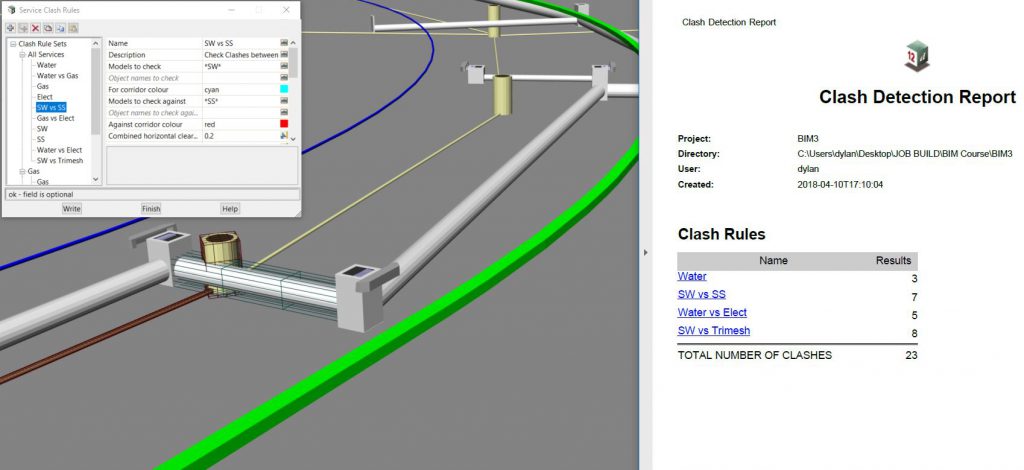
The Sydney B-Line bus project has revolutionised bus travel along the Northern Beaches and Lower North Shore into the northern end of the CBD. Such an ambitious project presented certain challenges, including narrow corridors, especially through Neutral Bay and Cremorne, where roads are congested with utilities.

With the help of 12d Model with the 12d Viewer (12d View), Mick and his team were able to alleviate the strain of such an enormous project detracting from their day-to-day work. When their engineers were able to harness the power of 12d View for their utility analysis, time, cost and quality benefits ensued, meaning the engineers involved in the project were afforded greater ownership and accountability, leading to a greater sense of empowerment. In turn, this allowed Mick to gain back some much-needed time each day, because he no longer needed to oversee other processes as much.

12d View screenshot

Mick said the installation process for adding 12d View was simple. Then once he added it on, he simply ran a Chain to output the models he needed on a weekly basis, and the designers would just read that in using drag-and-drop.

To hear more about how this innovative team uses 12d products, watch the video of our latest Industry Solutions webinar!

Fulton Hogan Website

–Lisa Stewart

12d View for Surveyors

Michael (Mick) Connor – Survey Manager at Fulton Hogan – will chat with me on 31st October at 1pm about his team’s use of 12d Model with 12d View (and 12d Synergy). This webinar will be based on a presentation Mick delivered at our 12d Technical Forum in July.

He’ll take us through their journey, and what they encountered on a recent important project – Sydney’s B-Line, which has revolutionised bus travel along the Northern Beaches and Lower North Shore into the northern end of the CBD.

Some of the challenges they encountered on this project included narrow corridors, especially through Neutral Bay and Cremorne, where roads are congested with utilities.

The Fulton Hogan team worked through the night most nights to minimise disruption to users of the existing network until the new one could be launched.

Mick found that the enormous project was detracting from his day-to-day work, and he needed to find a better way to do things. Enter 12d Viewer.

Using this innovation in 12d Model, Mick’s team saw time, cost, and quality benefits, leading to greater empowerment for the engineers involved in the project – it allowed them ownership and accountability, and in turn this allowed Mick to achieve more with his days because he no longer needed to oversee other processes as much.

To hear more about how this was achieved, register to attend our free Industry Solutions Webinar at 1pm (Sydney time) on Wednesday, 31st October, 2018.

–Lisa Stewart

Civil Object Creation in 12d Model

Steve Hunter of AECOM spoke to our 2018 Technical Forum delegates in July about civil object creation in 12d Model software.

Steve said that at the time of the 2016 12d event, most of the designers he was working with had come to grips with workflows and mechanisms to expand their modelling of civil infrastructure with the solid modelling realms of trimesh pavements, plus linear elements such as kerbs and barrier systems. He said they were already reasonably proficient at reading in structural models, and two years later the focus on the digital engineering modelling effort has grown even more intense, with seemingly endless demands to expand the content and depth of 3D models. All this extra output has needed to come without taking its toll on the design effort put in to the generation of end products. The critical word in that last sentence is ‘design’, and it goes a long way to explain the major difference between the process that goes into developing a traditional Building Information Model (BIM) and a modern Digital Civil Engineering Model. Even the difference between the terms ‘Structural Drafter’ and ‘Civil Designer’ gives additional clues as to this difference.

Virtually all the workflows and driving forces behind generating a structural BIM revolve around progressively bolting on more and more detail as the design evolves, with nearly all the detailed embellishments being edited in a virtually static framework. In a civil or linear engineering design – the ‘BIM PowerPoint’ – there is never any guarantee that even the most detailed object is in the final location, or that the number of objects won’t change as designs are optimised to give clients the most cost-effective, safe and practical design; invariably through a process of intensive duration that can even continue into detailed design at times.

In Steve’s opinion, a single majestic pass for a civil engineering design progressively adding on more and more detail to the original concept is likely to lead to delivering a detailed but non-optimised solution. A civil engineering design is a dynamic process, and every detail added to models must be flexible and self-healing, adapting to the many ongoing design changes brought about by the optimisation process to prevent modelling errors. Designers should not allow themselves to be ‘painted into a corner’, unwilling to make major improvements or updates to alignments and designs because it’s just too hard to make any manual changes that result.

To Steve, the term ‘BIM’ has come to represent the effort to shoehorn into a civil engineering model a system designed around a building or structural framework. A classic example of this is the mindset of pretending a road is just a really, really tall building with cars driving on it, and that the floors are regularly shaped segments along the road. Of course, roads are notoriously uncooperative and have awkward stuff in them like interchanges, which pushes the building analogy to its limit!

Steve felt it was important at this juncture to highlight the main purposes of a federated linear engineering model. By far the most important is that of space-proofing – eradicating clashes between objects created by the various design teams that contribute to the final design; this has always been the cause of many last-minute frantic design changes out on site when most of these clashes were finally discovered.

Of course, to run this space-proofing or clash detection process, which is not always a formal reporting process as it also includes the simple but always effective ‘eyeballing’ process, you need to have all these objects created to the level of detail appropriate to their use in the digital engineering model. This leads to the debate about what constitutes an appropriate level of detail for a particular object. For instance, when modelling the top of an access chamber, does adding the surface textures really add to the value of the space-proofing process? As you continue to work your way through the list of details that don’t contribute to the space-proofing function of this object, you eventually get something that takes up the rim of the riser and the lid, and which is located where the access point will be relative to the part configuration as this may impact on surface features.

One of the other important uses of civil objects is as placeholders for additional information or metadata about the object, meaning that unnecessary detail does not need to be crammed into civil objects, particularly when most of these are actually standard objects, and this additional information can be provided by simply referencing the documents containing this additional detail. An example of unnecessary detail is including something like a physical grate in a model of civil objects. This level of detail bloats model data size with little real benefit to the primary reasons for modelling these objects in the first place. A solid object taking up the space occupied by the grate with metadata attached to it has exactly the same value without the data footprint.

Humans are primarily visual creatures, Steve maintains, and we are programmed to think that the level of pleasing, superficial visual detail is directly comparable to something’s true value in this world. In the 12d world, a classic example you often see of this is something simple like non-textured vs textured TINs – it looks pretty and visually appealing, but the true value of the 3D model in a perspective view is shown in a simpler but correspondingly more valuable non-rendered way when design abnormalities are visible and can be identified and rectified.

The 3D models produced by Steve’s team are engineering models, not visualisation models, and this is particularly the case when trying to inject realism into models to make them theoretically better, while actually reducing their true engineering value. There’s an ongoing debate about how to model hybrid linear objects such as guardrails where they can use the realistic looking 12d Model extruders to show the posts and rail for guardrails, and even use these extrudes for sight distance checks.

AECOM’s guardrail snippet produces a trimesh region representing the space above ground for sight distance checking, and another below ground that the guardrail installation will occupy for clash detection. Their civil designers keep challenging the engineering value of modelling individual posts, and repeatedly point out that it can actually be misleading to apply interval-based posts based on the extents of the strings designed to represent the guardrail. Even if end treatments are excluded and simply paced out in two-metre steps from the start of the guardrail string, this process starts to unravel where the guardrail passes from one MTF function to another, resulting in a new string and a reset in the post placing. This means that the posts are potentially in the wrong location and false positives could result when running clash detection reports. False negatives that flag further investigation are vastly more acceptable than false positives, which can mask potential problems.

Humans often have the tendency to jump to the conclusion that something which looks more detailed is automatically more accurate. There are examples of fence posts being shown in great detail but in purely interval-based locations; they’re not representative of where they’ll actually be built. Treating fences and noise walls with the same logic as guardrails, the AECOM team runs a custom extrude along a super string representing the fence location, generating a model of the zone where the fence post may be, and addressing the potential clashes more closely when they are identified. Their current challenge in how they model isolated civil objects in a practical manner is doing so in a fashion which does not require a ‘doctorate in macro programming’, therefore limiting it to a select few. The process also needs to be immune to inevitable design changes as the engineering model is optimised and amended throughout its design life cycle. Civil objects they need to include in their digital engineering model originate either inside or outside 12d. Inside 12d they have 3D features such as electrical objects and survey models; outside 12d they often have 2D features (generated by specialists in other packages) – e.g. signs and line marking or street lighting and traffic signal layouts. It can be pretty alarming that objects which appear insignificant on a 2D drawing actually occupy a large amount of 3D space through which they’re trying to thread proposed utilities.

The civil object workflow is not limited to existing and proposed utilities, and can be used for other civil objects such as a very large chunk of concrete that may be needed for anchoring wire rope safety barrier systems. Bearing in mind that the reason they’re creating these civil objects in the first place is primarily for space-proofing, an allowance needs to be made for such a large block of concrete. What makes this object different from, say, a light post, is firstly that the holding symbol needs to be applied to the end of the model of the wire rope safety barrier string and secondly that the orientation of the holding symbol needs to match that of the string terminal. To achieve this aim, the AECOM team organised to create a custom macro in 12d to achieve this…enter Sam Cech of Tatras Consulting in New Zealand! The resulting wire rope safety barrier snippet produces a result very similar to the guardrail snippet, plus it adds terminal information attributes to the marker string which is then used to place the holding symbol. When the civil object chain is run, the trimesh terminal objects take up space in the federated model for the BIM folk to play with.

Sam’s macro is also used to place civil object holding symbols for other directional objects such as light poles and traffic signals with mast arms. In theory, if the focus is purely on space proofing and clash detection, it is primarily the post and footing that are important; the rest is aesthetics. They do, however, want to make viewing the federated model an intuitive experience to allow for easy visual identification of civil objects, and fortunately setting the orientation to these objects is easy to automate. For the Surveying team at TMR, for instance, the mast arms for traffic signals and light poles are represented by two points running from the lantern to the base of the pole, and by placing a holding symbol at the end of the string and running the civil object chain you get lights that are correctly orientated with a process that’s about the same amount of effort as applying a standard mapping file.

Steve originally thought they’d need a drawing template based civil object chain to run on the drainage PPF plans to evolve their drainage network into what is needed for federated engineering models, but he started investigating the option of drainage trimeshes that are set in the drainage.4d file and – as with the other civil objects shown – it relies on a 3D library of drainage structures to cap off the top of the drainage model chambers, with up to 24 variations needed for each pit style to take into account lintel size, channel width, inflow configuration and orientation relative to the kerb. These have always been defined for hydraulic reasons but now also need to take into account the kerb type to include the kerb transitions in the trimesh (and ultimately in the federated model). The top structure of the gully pits and access chambers orientate themselves in the same way as the drainage plan PPF plots, including automatically adapting to the flow direction so no extra effort is required from the drainage designers because the drainage trimeshes update with a standard set pit details process. Steve was particularly impressed that the drainage trimesh also tilts itself to suit the road grade calculator and the setout string, so the final 3D orientation is actually very close to the real thing.

AECOM’s drainage designers have always modelled the existing drainage network, primarily for hydraulic reasons, but it’s now included in the federated model, and one of the processes designers typically had to do pre-BIM was to separate the drainage model into the kind of categories or states that are referred to in the modelling of utilities, partly because the various states can then be visually identified or even manipulated visually in the federated engineering model. Engineers and ‘BIM folk’ become concerned if they see a drainage structure in the middle of the road on a design,  even if it is one that’s flagged for removal, so it may be necessary to temporarily hide objects such as these. You can currently do this in 12d Model by incorporating and identifying the pit and pipe names and filtering for these in the drainage trimesh model – i.e. splitting them into submodels.

The final plan integration of these model drainage structures into AECOM’s models is adapting the road designs to leave gully pit shaped holes in their design surfaces and other trimeshes. Steve ‘tried to be sneaky’ by including a boundary string in the drainage pit trimesh definition which could then potentially be used with a 12d Model 14 trimesh cookie cutter, but unfortunately 12d was too smart for that and ignored it when reading into the drainage trimeshes! His team can, however, adjust their road strings to suit a drainage object with a bunch of fiddly MTF modifiers, tucking these away inside snippets to avoid alarming those poor engineers and BIM designers. It is even possible to create a null string containing the TIN boundary attribute to automatically cut a hole in any TIN the boundary is actually included in.

Enter your details to view the full presentation here.