More on 12d Model Customisation

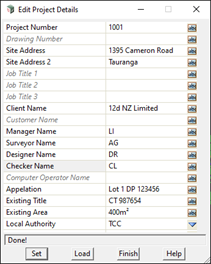
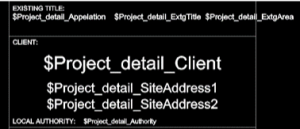
Customisation inside 12d Model can be as easy as setting up a title block file or editing the Project Details Panel to have variables more specific to your own workflows and needs.

Custom Linestyles and symbols are easily created on the fly if need be and can be referenced back at any time in the future.

Feel free to contact your local 12d Model Support team to help in setting up any customisation you may require.

(With thanks to 12d NZ Ltd for this special content.)

Using FME with 12d Model

I caught up with our co-founder and Managing Director, Dr Lee Gregory, to chat about Using FME with 12d Model.

12d Model has a very rich data set and attribute structure which is not supported by most file transfer formats.

This usually means that only a portion of the 12d Model data can be transferred, and different decisions need to be made depending on what the output format can support. And even worse, accuracy of survey and design data can be compromised.

The best solution is to provide clients with a 12dXML file that contains ALL the accurate data and attributes, allowing the client to decide how they want to manipulate the data for their various applications.

But how can this be done?

One solution is for the client to use FME.

FME, from Safe Software, reads in 12dXML files, can manipulate the inputted data, and write the manipulated data out in hundreds of different formats.

This video looks at what 12d Model data and attributes can be handled by FME.

BIM Data Management to Field Setout

I caught up with our Product Sales Manager for 12d Field, Graham Wirth, to chat about BIM Data Management to Field Setout.

This presentation explored the difficulties surveyors can experience when setting out Design solid models. Initially, designs using BIM or solid modelling were restricted to building structures. This format is now becoming the norm across most structural infrastructure designs. Surveyors’ traditional use of line and point positioning technologies needed new methods to manage setout of solid design models.

Graham’s presentation demonstrated new digital tools that assist surveyors with this process. Using the IFC BIM data exchange format, surveyors are able to import Solid models traditionally referenced at a 0,0,0 coordinate location. We also explored conversion to metres and using 2D and 3D transformations to bring the model into a real world geodetic position, as used by surveyors. With the IFC format ability, surveyors can separate the structure elements critical to setout requirements, such as footings, slabs and columns. These solid elements are then able to be broken down to the points and lines for setout.

–Lisa Stewart

12d Model Snippets – “Under the Hood”

As there are now quite a few resources covering how to write snippets in 12d Model, we decided to offer up a webinar this week that’s something a bit different…

“Snippets – Under the Hood” takes a high-level look at how/why things work the way they do, and also how to understand error messages.

Join Joel Allsop from Extra Dimension Solutions in this interesting look at Snippets and their uses.

This is a fairly informal session with the trainers from ExDS and 12d Solutions, but we invite you behind the scenes to hear about this incredibly useful aspect of 12d Model.

Perfect for intermediate to advanced users.


12d Model Customisation

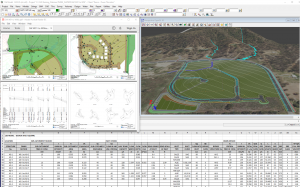
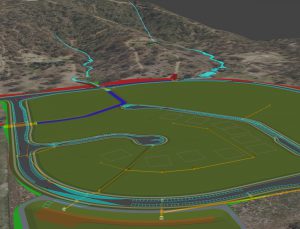
Many of our 12d Model customers have commented over the years that one of the extra special things about our software is its capacity for customisation. Many of those customers have gone on to write some pretty amazing macros to expand their use of 12d Model. Some of those macros have even ended up being included in later releases of the software!

Examples of 12d Model Customisation

You can see some examples of case studies on customers using macros here (see the ‘Customisation’ section).

We’ll also soon be releasing more information on some of the incredible Customisation entries we’ve received across all our Innovation Awards – stay tuned!

Our website includes a page on Customisation downloads, which is a really handy reference.

You can also head over to our YouTube Channel and check out our 12d Model Customisation playlist!

Tatras Consulting Ltd

One of our most prolific macro writers over time has been Sam Cech of Tatras Consulting Ltd in New Zealand. He’s even happy to share many of these with other 12d Modellers, free of charge – click here to see the range! On the Tatras website, it states:

“For the last decade 12d User Forum has been the “go to” site for support and knowledge sharing about 12d Model.  Users participate in over 8000 topic discussions and many share not only their “how to” knowledge but also configuration skills with over 100 macro source codes posted with over 4000 downloads. 

Our pick of the best open source/free macros is below authored by various users and sourced from 12d User Forum.  While downloading source code and compiling macros can be lot of fun some users find it complicated and would prefer ready to go compiled versions.  As long as you are happy to accept the following terms and conditions you can download compiled macros below.  If you prefer to download the source code, choose the User Forum link next to the macro.”

Of course, some 12d Modellers require something a little more specific, and on that front, Tatras is also able to assist (click here for details on their Macro writing services).

Their macro writing service has been extra popular during 2020, with so many people from home looking for increased consistency and productivity.

Give it a go!

The only real limits to what you can do with 12d Model Customisation are your imagination and know-how…and who knows? If you become proficient enough at creating your own macros over time, maybe you’ll go on to be a prize winner in our next Innovation Awards!
12d Model in action

We’re often asked questions by new users about how 12d Model software is used. While we’ve always had a Case Studies section on our website, we recognised in recent times that it had become a bit unruly.

With over 100 case studies online, and more being posted regularly, there’s a lot to look at!

As such, we’ve updated the way these are displayed, with the more recent stories near the top of the page. We’ve also streamlined the categories, so when you ‘Sort By Type’ (top right-hand corner), you can more easily find the topics you’re looking for.

You can also ‘Sort By Company’ and ‘Sort By Location’.

If you’d like to suggest a case study for us to follow up, or if you’ve got a project you’re working on that you’d like us to feature on our website (or perhaps in an upcoming issue of The Dirt Digger), please feel free to get in touch (you can email Lisa at info@12d.com)!

MPS Frames and Node Referencing

I caught up with Dylan Revell of 12d NZ Ltd yesterday to chat about Multipage Plots again…this time with a focus on Frames and Node Referencing.

Following on from the ‘Multipage Plots Overview’ webinar which introduced the structure and functionality of MPS plotting in 12d Model 14, the MPS Frames and Node Referencing webinar covered in greater detail the types and purposes of MPS nodes and sub nodes.

We looked at the different MPS frame types that can be used to produce complete page compositions for plotting including plans, cross sections, long sections, perspective, 3D PDF, and water node Frame types.

Referencing of MPS sub nodes was also demonstrated, enabling users to reduce or eliminate manual duplication of plotted compositions including title blocks, frames, models, and text.

We also covered how to utilise CSV drawing registers to populate title block information and custom page numbering. The process for linking to MPS pages was also included in this webinar.

A section on MPS Special Chapters, enabling the power of existing 12d Model plot parameter file (PPF) plotting operations, managed within the MPS, completed this exciting session!

–Lisa Stewart

Project Review and Delivery – Stormwater Projects

I caught up with Owen Thornton of 12d Queensland for the sixth and final episode in the Stormwater Drainage Design Fundamentals Training Webinar Series: Project Review & Delivery. This very popular series has covered the basic and intermediate aspects of the Three Waters modules in 12d Model 14, with special emphasis on the design of stormwater drainage.

In this episode, we reviewed the storm analysis results and made some small improvements to the pipe sizes and grades, whilst discussing the settings of the Water Network Editor and feedback from the analysis in the Output Window. The major storm events were also analysed, highlighting the different settings required. Finally, deliverables were produced, including plan, long section and structure detail drawings, hydrology and hydraulic calculation tables, and a Buliding Information Model of the design in IFC format.

For easy reference, here are the links to our blog posts from the previous episodes in this series:

Episode 1

Episode 2

Episode 3

Episode 4

Episode 5

Multipage Plots in 12d Model 14

I caught up with Dylan Revell of 12d NZ yesterday to chat about all things MPS, in a great webinar with a lot of very engaged and inquisitive attendees!

This session provided a brief overview of the Multipage PlotS (MPS) functionality in 12d Model software, paying particular attention to how this has been updated in 12d Model 14.

Dylan explored:
– What is a MPS?
– What does a MPS Create?
– How does it work?
– Node and sub node structures

He also offered brief introductions to referenced sub nodes and .csv drawing registers, both of which will be covered in more detail during a future webinar.

–Lisa Stewart

Overland Flow and Flood Extents

I caught up with Owen Thornton of 12d Queensland for the fifth episode of his Stormwater Drainage Design Fundamentals series: Overland Flow and Flood Extents.

Owen demonstrated the Water Network Editor being used to establish links between water networks and overland flow strings. The water networks were then analysed to produce 3D models of the flood extents, relative to the surface model, indicating the combined effect of catchment runoff and bypass flow rates. This step is fundamental to achieve a design with a nominated immunity, and to verify that inlet nodes are properly located to control the overland flows.

This series of training webinars covers the basic and intermediate aspects of the Water modules in 12d Model 14, with special emphasis on the design of stormwater drainage. It is presented as a condensed overview of the material normally covered in the first two days of the formal Three Waters training courses (W01 to W06) offered regularly by 12d Solutions. This material is assumed knowledge for many of the more advanced training courses available in the 12d Water suite.

A construction-ready drainage model – including catchments, pits, pipes, culverts, channels and flood extents – is created from scratch in 3D and designed for specified minor and major storm events using the Rational Method. Output plans, long-sections and calculation tables are also produced.

For easy reference, here are the links to our blog posts from the previous episodes in this series:

Episode 1

Episode 2

Episode 3

Episode 4