Brief Overview of ISO 19650
Scratching your head about ISO 19650? Don’t worry, you’re not alone!
You’ve probably heard ‘ISO 19650’ dropped into discussions around BIM and digital engineering. Likely this was quickly followed by a wave of foreign terminology: PIRs, AIRs, BEP, CDEs, appointing party, information containers, the list goes on…
This article aims to introduce you to the ISO 19650 series and provide an overview into the key concepts and principles defined. We’ll discuss why the standards are important, summarise the information management process, and work through the CDE workflow for the delivery phase of assets.
ISO 19650 is becoming the global BIM standard for information management and many Australian & New Zealand organisations are working towards certification with the standard. So whether you’re a consultant, contractor, operator, asset owner, or client, strap in – you’ll need to understand ISO 19650.
For a comprehensive overview of ISO 19650, read The Ultimate Guide to ISO 19650 by 12d Synergy here.
What is ISO 19650?
ISO 19650 is a series of international standards which define a common unified framework for the effective collaborative production and management of information across the full lifecycle of a built asset using Building Information Modelling (BIM).
Essentially the overall objective of the series is to ensure that the right people are working on the right information at the right time. With the ultimate aim being to help deliver built assets on time, within budget, and to standard.
ISO 19650 is concerned with information management in the delivery and operational phases of assets and exists within the larger context of your organisation’s asset management and QA systems.
The Importance of ISO 19650
As previously mentioned, this standard is designed to help you, whether you’re the client, asset owner, or part of the team working on the project. Not only does this standard remove wasteful activities which can create information that is inaccurate, ambiguous, or incomplete, it’s intended to ensure collaborative work and effective communication among the different parties is accomplished. This means clear channels of communication not just with the different disciplines and teams needed for a project, but also between the client and the consultancy or contractor.
Basic Principles of ISO 19650
Created and set by the International Organisation of Standardisation (ISO), there are several basic principles which govern the standards:
- The client establishes the project’s information framework, which includes the information requirements, the standards utilised, delivery milestones, the information production methods & procedures, the Common Data Environment (CDE), and the Project Information Protocol. This is then communicated to prospective delivery teams.
- The delivery team(s) plans a schedule to meet the Project Information Protocol, and mobilises resources (people, technology, processes) to achieve this. Processes and systems are tested, and further team members are hired and/or trained to ensure their suitability.
- Information is collaboratively produced and managed between task teams (i.e., across disciplines).
- Information is managed in a CDE, a collaborative and secure platform. This system ensures the right people work on the right information at the right time.
- At each level, information that is produced by the task teams are assessed and reviewed for approval. Access to information is given and shared accordingly to the correct and appropriate teams.
- Once everything has been given the final approval by the client, the information is aggregated together and archived for the ongoing operation and maintenance of the asset. If future data is needed on the asset, this Asset Information Model (AIM) can be referred to.
The Information Management Process
ISO 19650-2 defines a structured process for the delivery of built assets known as the information management process. This process has 8 stages starting from the initial assessment and concluding on project completion as seen in the following image:
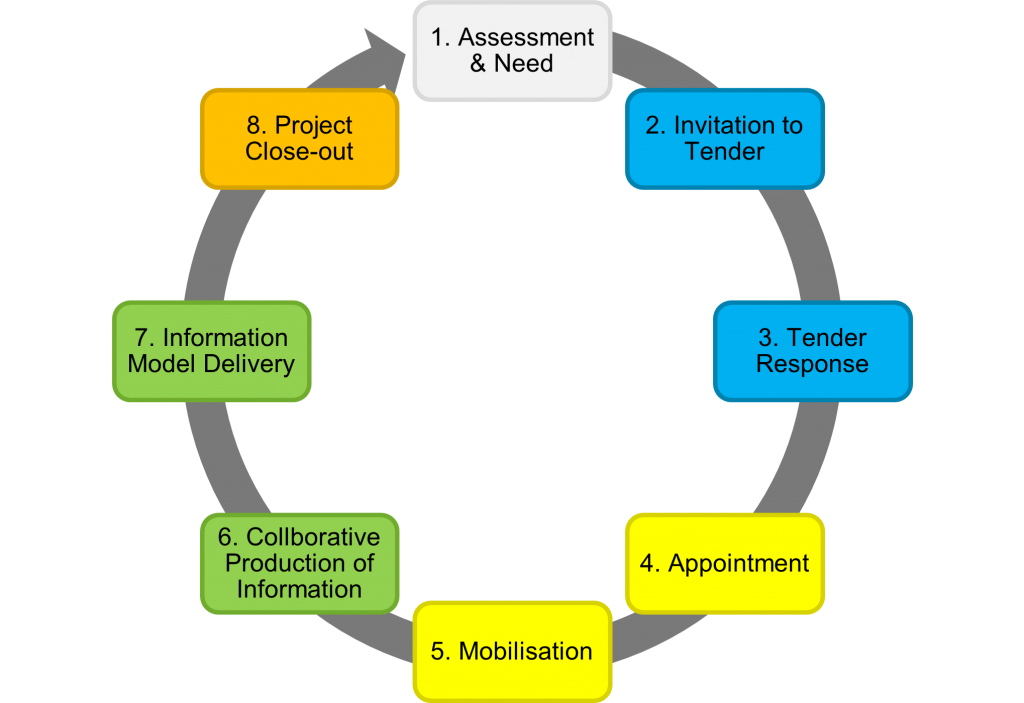
It’s important to note, some stages may be repeated for each appointment (contract) of the project and the lifecycle is not a simple linear relationship. For projects with multiple appointments (i.e., different lead appointed parties for design and construction) stages 2 to 7 are repeated. Whilst stages 1 & 8 occur only once per project.
There are three phases within the information management process. The procurement phase (2-3), the planning phase (4-5), and the production phase (6-7). You’re probably already familiar with the project delivery and asset lifecycle. But ISO 19650 introduces new terminology to globalise the standard.
These 8 stages are summarised below. For a comprehensive overview of ISO 19650, read The Ultimate Guide to ISO 19650 by 12d Synergy here.
1) Assessment & Need
The appointing party (E.g., the client) determines why works are to be carried out, an example for this could be to improve a highway’s capacity. They will also need to establish the project’s information requirements, information standard, and project milestones which are compiled into the PIP.
2) Invitation to Tender
The appointing party then establishes their tender response evaluation criteria, so how all bids will be assessed and judged. Once the evaluation criteria are finalised, they will issue a tender inviting organisations to formally bid for the works.
3) Tender Response
Prospective delivery teams (E.g., engineering consultants or contractors) prepare and submit a response showcasing and demonstrating their approach to the works. The response should also assess their capability and capacity for the job. This is outlined in their pre-appointment BIM Execution Plan (BEP) and Risk Register.
4) Appointment
Tenders are evaluated and the successful delivery team is selected, known as the lead appointed party. The team now undergoes detailed planning and prepares a schedule outlining how and when items will be completed to meet the appointing party’s Exchange Information Requirements (EIR) and information delivery milestones.
5) Mobilisation
The lead appointed party ensures they have the right people, processes, and technologies in place to deliver the works. Teams are trained up if needed and the Information Production Methods and Procedures are tested and documented to ensure they are appropriate for the works.
6) Collaborative Production of Information
Works begins and information is generated, coordinated, checked, reviewed, and approved by the lead appointed party. Each appointed party (task team) within the delivery team may represent a different discipline on the project (E.g., road design, geotechnical, electrical) and once their information has been approved, they can share to other teams for reference and coordination.
7) Information Model Delivery
The appointing party reviews the information model against their acceptance criteria and either approve or reject it as a contractual deliverable. This is repeated for each milestone and information delivery on the project until the appointment is completed.
8) Project Close-out & Asset Information Model Aggregation
Once all appointments have been completed, the information is archived and aggregated into the AIM for the ongoing operation and maintenance of the asset.
Information Generation, Coordination, and Federation
The production phase or steps 6 & 7 in the information management process are crucial in terms of maximising resources and eliminating those wasteful tasks mentioned previously. This is where a CDE comes into play.
It’s the technology that enables the ISO 19650 information process. A collaborative platform which once information containers (i.e., files, data, design, models) are produced, it can be managed and shared within this system.
The onus is placed on the appointing party to implement and manage a CDE on the whole project, however it’s unlikely that there is only one CDE which manages everything in the project. Each lead appointed party may be responsible for managing their own CDEs for their appointed parties. The CDE is likely to be an ecosystem of integrated IT system rather than a singular product.
CDEs can include data management systems (like 12d Synergy), geospatial information systems, and engineering management systems.
ISO 19650 states that information within a CDE should be:
- Created once and re-used many times, eliminating any future rework and wasteful tasks. There will be newer versions of information that will constantly be updated until approved.
- Continuously shared and trusted amongst team members. Approved information can be used as reference by other teams.
- Have a clear auditable history, identifying where the information came from, who amended it, and when this was done.
- Checked, reviewed, and approved before it is shared with other team members. The information should be authorised at each level. This must occur within task teams, before the delivery team, and finally with the client.
- The state of the file within the CDE workflow needs to be clearly identifiable, along with its revision and status. Access should be controlled accordingly depending on who the team member is.
The CDE workflow organises the flow and management of information across the whole lifecycle of an asset across four states: Work in Progress (WIP), Shared, Published, and Archived. The process can be seen in the image below:
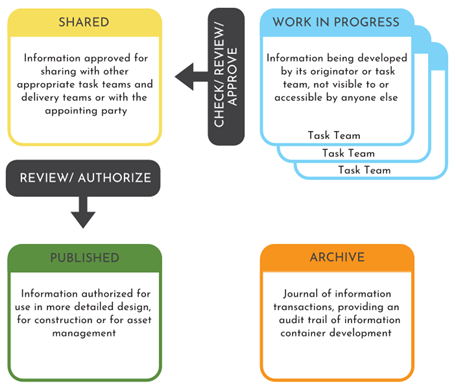
Work in Progress (WIP) (Creating Information)
This stage is where information production occurs by task teams. Files are editable and are unapproved for sharing with the wider delivery team. Access is controlled by the CDE to prevent other task teams from working on, referencing, or issuing draft information.
WIP to Shared (Information Coordination)
WIP information is shared with other task teams after passing a QA check and technical review. Shared information is not approved as a deliverable but approved to be shared with other members of the delivery team.
Shared (Coordinated Information)
Shared information is information that has been verified to be shared with the delivery team. Shared information is read-only and must be the most current approved revision of the information container.
Shared to Published (Information Delivery)
The information is then approved internally for publishing with the client. Publishing occurs for each information delivery milestone.
Published (Information Deliverable)
Published information is information that has been reviewed and authorised as a deliverable by the client. It is read-only information and must be the most current authorised revision of the information container. Published information is accessible by the entire project team.
Archived
Once all delivery milestones have been met and all appointments have been completed, the information model is aggregated and archived to enable the ongoing operation and maintenance of the asset. This ensures there’s a definitive final version of project information available in case it needs to be referred to by the client, after the project has been completed. This is read-only information and only visible to the client and the CDE administrator.
Now, this is an extremely brief overview. There are more key concepts, principles, and processes of the standard. To learn more about ISO 19650 and all its details, check out 12d Synergy’s comprehensive overview of the series: The Ultimate Guide to ISO 19650 by 12d Synergy.