Sub-Grid Sampling and Quadtree

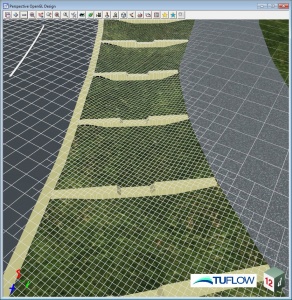
TUFLOW’s recent implementation of Sub-Grid Sampling and Quadtree grid refinement produces quality results without the need for a small cell size throughout the entire TUFLOW grid. 12d Model 15 includes both of these features, so I caught up with Chris Huxley from TUFLOW and our very own Rob Graham to discuss the detail behind these improvements and how they have been implemented into 12d Model.
Chris is a principal engineer for TUFLOW with over 17 years’ experience in the field of flood/stormwater modelling and floodplain management. He is currently a senior member of the TUFLOW hydraulic modelling software development team. He is also an Adjunct Lecturer at Central Queensland University where he teaches hydraulic modelling. Prior to his current role in the software development and teaching sectors, Chris worked in consulting and successfully carried out and managed numerous catchment-wide riverine and stormwater flood studies and floodplain risk management investigations throughout Queensland and New South Wales, as well as in California, USA.

Rob Graham, for those who don’t know him, is our resident Water Resources Engineer, with over 20 years of experience here at 12d and over 30 years’ in the hydraulic and hydrological modelling field industry. Commencing with physical hydraulic modelling and river surveys, Rob’s projects moved focus onto numerical modelling for flood and hydro-electric studies. In 1985 he began developing hydraulic models with close linkages to data terrain modelling software. Today he leads the integration of TUFLOW inside 12d Model.

ARVE error: Invalid datetime: Sub-Grid Sampling and Quadtree

The session was a very interesting one. Chris ran us through two new features in TUFLOW: Sub-grid topography sampling and Qudtree mesh refinement. He discussed the implications of these on modelling. Rob then showed us how these work inside 12d Model 15. We also looked at a short Quadtree SGS video produced by 12d of the Sheffield Water Quality Project, to see an example of Sub-Grid Sampling and Quadtree used to analyse flow through a water quality structure.

–Lisa Stewart
MetaConnex

MetaConnex is the latest 12d Model tool that empowers data consistency. It’s flexible and powerful, and connects your data to your metadata (attributes) requirements.

I caught up with Paul Hardwick of 12d Queensland to see how this new system can help 12d Modellers to make the most of their data.

With Paul’s background in Surveying, I wasn’t sure how widely to expect this feature to be applicable, but as it turns out, it’s particularly useful for users of BIM , ADAC, A-Spec, RAMS (TfNSW), and GIS data, and will definitely be a very important new addition in 12d Model 15.

MetaConnex is a structured list of attributes based on code names. It has computation capabilities, and allows validation of attributes.

MetaConnex allows you to set and validate your attributes before you export your data. Instead of using multiple options inside/outside of 12d Model, MetaConnex allows you to dynamically calculate attribute values from your data or manually add attributes to your data.

MetaConnex has over 90 calculation functions that can be used to calculate attribute values on the fly. The values can also be concatenated to create one value.

Check out the video of Paul’s presentation:

–Lisa Stewart

CSI – An Interface for Stormwater Planning

I caught up with Mal Peaker of 12d Queensland for the second episode in our new ‘What’s Coming from 12d’ Webinar Series: CSI – An Interface for Stormwater Planning.

This exciting presentation provided a quick look at Concept Stormwater Interface (CSI) – the new stormwater interface for Dynamic Drainage.

This interface is targeted at conceptual phase stormwater designs where users have limited/no input data, and provides a schematic representation of the network to enable rapid interpretation of the model elements.

–Lisa Stewart

12d Model 15 Themes

In this first episode of our brand-new ‘What’s Coming from 12d’ Webinar Series, Dylan Revell of 12d NZ introduces us to the exciting development of Themes inside 12d Model.

Themes are the culmination of many years’ work and feedback about providing efficient user interface workflows for navigating and utilising the incredibly comprehensive suite of tools available to 12d Model Users…and you might also get a sneak peek at the new look 12d Model!

Check out the video from this great presentation today, and stay tuned for more webinars in this new series!

Wellington Water

Wellington Water is made up of six Councils within the Wellington Region and is responsible for receiving and validating three-waters asset information from civil engineering projects in their region.

12d Model allows for easy production of the required information enhancing the 3D Model data, with enough flexibility to allow the Metadata to be captured either in the field or in the office.

The whole process is focused on 
minimal manual metadata entry, ensuring that the required metadata standards are captured in an efficient way, which also reduces the risk of incorrect metadata flowing through into the Asset Managers work-flow

As the metadata is efficiently pre-populated and checked, to further reduce the risk of the digital data not representing the spatial plans produced for Council sign-off, the 12d Model system contains routines to automatically produce and label PDF plans 
directly from the 3D model.

A fully booked second round of training for Wellington Water’s Three Water asbuilts process was undertaken in early November, more to come in the new year.


For more information on Wellington Water, 
Click here

(With thanks to 12d NZ Ltd for this special content.)

12d Model and Point Clouds

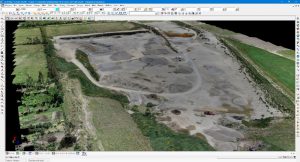
With laser scanning and Lidar information becoming more and more prevalent in the day-to-day operations of our 12d Model users, we thought it was a good time to remind you that 12d Model has been able to work with very large data sets for a while now!
 
The 12d Model Bigfoot points module was released 
way back in 12d Model 9, and new technology and computer specifications have made it so much easier for more 12d Modellers to utilise this data rich format.

And with the ability within 12d Model to manage the viewing via OpenGL views and drawing density control you don’t even need a super-computer to work with them. 12d NZ recently imported a 7 billion point cloud into one of our staff member’s laptop!
There are some great functions in 12d Model to manipulate the point cloud data to make it easier to work with in your normal 12d survey and design operations such as:
  • Point Cloud thinning
  • Point Cloud categorisation
  • Adding or removing categorised points within the point cloud
  • Deleting points via tin ‘areas’ and relative heights
If you would like to learn more we will be happy to share these tips either via an online demonstration or in person.
(With thanks to 12d NZ Ltd for this special content.)

More on 12d Model Customisation

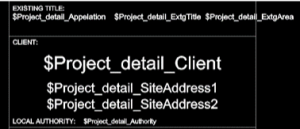
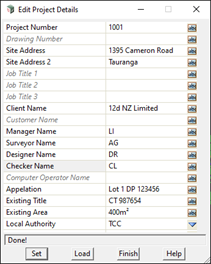
Customisation inside 12d Model can be as easy as setting up a title block file or editing the Project Details Panel to have variables more specific to your own workflows and needs.

Custom Linestyles and symbols are easily created on the fly if need be and can be referenced back at any time in the future.

Feel free to contact your local 12d Model Support team to help in setting up any customisation you may require.

(With thanks to 12d NZ Ltd for this special content.)

Using FME with 12d Model

I caught up with our co-founder and Managing Director, Dr Lee Gregory, to chat about Using FME with 12d Model.

12d Model has a very rich data set and attribute structure which is not supported by most file transfer formats.

This usually means that only a portion of the 12d Model data can be transferred, and different decisions need to be made depending on what the output format can support. And even worse, accuracy of survey and design data can be compromised.

The best solution is to provide clients with a 12dXML file that contains ALL the accurate data and attributes, allowing the client to decide how they want to manipulate the data for their various applications.

But how can this be done?

One solution is for the client to use FME.

FME, from Safe Software, reads in 12dXML files, can manipulate the inputted data, and write the manipulated data out in hundreds of different formats.

This video looks at what 12d Model data and attributes can be handled by FME.

BIM Data Management to Field Setout

I caught up with our Product Sales Manager for 12d Field, Graham Wirth, to chat about BIM Data Management to Field Setout.

This presentation explored the difficulties surveyors can experience when setting out Design solid models. Initially, designs using BIM or solid modelling were restricted to building structures. This format is now becoming the norm across most structural infrastructure designs. Surveyors’ traditional use of line and point positioning technologies needed new methods to manage setout of solid design models.

Graham’s presentation demonstrated new digital tools that assist surveyors with this process. Using the IFC BIM data exchange format, surveyors are able to import Solid models traditionally referenced at a 0,0,0 coordinate location. We also explored conversion to metres and using 2D and 3D transformations to bring the model into a real world geodetic position, as used by surveyors. With the IFC format ability, surveyors can separate the structure elements critical to setout requirements, such as footings, slabs and columns. These solid elements are then able to be broken down to the points and lines for setout.

–Lisa Stewart

12d Model Snippets – “Under the Hood”

As there are now quite a few resources covering how to write snippets in 12d Model, we decided to offer up a webinar this week that’s something a bit different…

“Snippets – Under the Hood” takes a high-level look at how/why things work the way they do, and also how to understand error messages.

Join Joel Allsop from Extra Dimension Solutions in this interesting look at Snippets and their uses.

This is a fairly informal session with the trainers from ExDS and 12d Solutions, but we invite you behind the scenes to hear about this incredibly useful aspect of 12d Model.

Perfect for intermediate to advanced users.