I recently caught up with Dylan Revell of 12d NZ to chat about the Quick Water Network tool in 12d Model 15.
This option allows you to rapidly create a water network layout of 12d Model water strings.
A user-friendly user interface and graphical image overlays make this the easiest way for new or existing users to create a network and understand the relationships and purposes of the nodes and links.
Used as a quick start option for either the Concept Stormwater Designer or Water Network Editor. It makes creating water networks quick and easy!
I caught up with Charlie Latchford of 12d NZ earlier this week to chat about the new GIS Interface in 12d Model 15.
This new interface enables users to import GIS features from the NZ LINZ data service website (boundary and rasters) and from published GIS REST servers (council Three Waters assets) or in-house GIS systems.
On Thursday 14th December, I caught up with Sharleen Cole-Swami of 12d NZ to talk about GNSS Vector Reporting (GVR) in 12d Model.
The GVR is a comprehensive tool that enables rapid calculation, graphical display, analysis and reporting for the averaging of GNSS vector observations. Sharleen will provide a detailed demonstration of the module, and show how it can add value to your workflow.
Watch the video of this informative presentation today!
I caught up with our Managing Director, Dr Lee Gregory, last week to chat about What’s New in 12d Model 15.
12d Model 15 has been our biggest release to date.
Lee took us through what was in the first release of 12d Model 15, and all the exciting things that have been added since then in our regular sub-versions!
If you missed the live session, the video is a great way to look at what 12d Model 15 can do for you.
The 12d Tech Forum is BACK for an incredible in-person event!
Get ready for an unforgettable experience in sunny Brisbane! After six long years, the 12d Tech Forum will return to BCEC in 2024.
The 12d Tech Forum 2024 offers a fantastic opportunity for engaging in educational sessions, fostering valuable connections, and networking (sometimes over dinner and drinks!) with other members of the 12d community.
The 12d Tech Forum provides education and inspiration to infrastructure professionals. It is the top destination for 12d Model and 12d Synergy customers and partners to gain knowledge and become a part of a thriving community of industry leaders and enthusiasts. The 12d Tech Forum is where the infrastructure’s finest minds come to learn and share, and it aims to fuel creativity, offer practical expertise, and facilitate connections that drive an inclusive future.
Join us and the 12d Tech Forum community for this unmissable three-day event; see https://12dtechforum.com/ for more details and to register.
When and where will the 12d Tech Forum 2024 take place?
Dates: Sunday 28th, Monday 29th, and Tuesday 30th July 2024
Venue: Brisbane Convention and Exhibition Centre (BCEC) – Boulevard Level
How much will it cost?
The Full Tech Forum Package for $1,220 +GST (currently discounted to $1,120) includes:
Welcome Event for one person
Tech Forum Gala Dinner* for one person
3 Full Days of Tech Forum Main Sessions
Any ‘Birds of a Feather’ Sessions
Award-winning food at all Morning/Afternoon Tea Breaks and Lunches
12d Polo Shirt and Other Goodies!
*Includes 12d International Innovation Awards 2024 Ceremony
Day passes will be released in due course. Credit card payments are accepted through our online store – keep an eye on www.12dtechforum.com for more details as they become available.
We’ve also secured group rates at nearby accommodation, through OzAccom (as per our previous Brisbane events) – book through https://events.ozaccom.com.au/12d-technical-forum-2024/accommodation to secure this deal!
What to expect from the 12d Tech Forum 2024
At this three-day event, 12d Solutions will be highlighting exciting features in 12d Model including new sub-versions, as well as new developments in 12d Synergy, and more! We will continue the ever-popular ‘Birds of a Feather’ breakout sessions on Design, Surveying, 12d Water, and 12d Synergy.
This event will be an invaluable learning and networking experience for users of 12d products and other industry professionals, in all areas of civil design, surveying and construction, water engineering, data management, and project collaboration.
The 12d International Innovation Awards will be presented at the Tech Forum Gala Dinner – contact techforum@12d.com for more details on entering.
The 12d Tech Forum offers:
A great opportunity to increase your 12d Model/12d Synergy skills
The ability to interact with the developers of 12d products
The chance to network with, and learn from, other 12d users.
Reasons to attend the 12d Tech Forum 2024
#1 Gain Invaluable Education and Training
Whether you’re a tech newbie or a super user, the 12d Tech Forum is the perfect place to equip your team with invaluable tips and tricks that will boost efficiency and productivity. Discover the latest software updates, industry trends, and best practices to help your team stay ahead of the curve.
With a jam-packed 3-day schedule, you’ll have plenty of opportunities to immerse yourself in the latest tech innovations and learn from industry experts who will share their insights on how to use these innovations to your advantage.
#2 Expand Your Network
The 12d Tech Forum isn’t just about education and training – it’s also a fantastic opportunity to connect with other professionals in your field. Rub shoulders with like-minded individuals, make valuable connections, and exchange ideas that could take your career or business to the next level.
Our event attracts a diverse range of infrastructure professionals, from industry leaders to up-and-comers, giving you the chance to meet people from all walks of life and learn from their unique experiences. By joining the 12d Tech Forum you’ll open yourself up to new opportunities, partnerships, and collaborations that could shape your career trajectory for years to come.
#3 Get Inspired by Industry Leaders
Elevate your knowledge and gain valuable insights from the 12d Model and 12d Synergy leaders themselves. Learn about the latest technological trends and advancements that will shape the future of the industry. Discover innovative solutions and strategies to help you take your business to the next level. With a diverse array of guest speakers and industry leaders, you’ll be inspired to make a difference in the infrastructure world and beyond. Leave the 12d Tech Forum feeling motivated, informed, and ready to tackle the challenges ahead.
#4 Unleash Your Potential
The 12d Tech Forum offers a unique opportunity for personal and professional growth, with access to the latest industry trends, practices, and innovations. Expand your knowledge and network with like-minded individuals who share your passion for technology. Immerse yourself in a collaborative environment where you can exchange ideas and gain valuable insights. Unleash your potential and discover new horizons for your career.
#5 Join the 12d Community and Thrive Together
The 12d Tech Forum is more than just an event, it’s a chance to join a thriving community. Connect with the 12d Model and 12d Synergy teams, including executives, to share your knowledge and gain valuable insights from experts in the field. Make lifelong friends and be a part of a community that has been growing and thriving for over 30 years. Together, we can innovate, inspire, and improve the industry. Join us and become a part of something bigger.
#6 Celebrate the Industry’s Achievements and Have Fun!
Our Innovation Awards Ceremony is a highlight of the event. Attend the Tech Forum Gala Dinner to applaud the ground-breaking work and extraordinary achievements of the global 12d Community. Be inspired by industry leaders and visionaries and enjoy an unforgettable experience filled with industry and media exposure, prizes, food, and drinks. Don’t miss your chance to become a 12d visionary and celebrate the industry’s success with us. And if you enter the Awards yourself, you might even be one of those receiving accolades on the night!
Need to convince your boss you should be attending the 12d Tech Forum?
Download our Proposal Letter to show how the 12d Tech Forum boosts your growth and benefits your company.
Click here to download the letter, update it as needed, and send it on to your boss today!
Registrations are already rolling in; let’s get excited together! Register today through www.12dtechforum.com.
Scratching your head about ISO 19650? Don’t worry, you’re not alone!
You’ve probably heard ‘ISO 19650’ dropped into discussions around BIM and digital engineering. Likely this was quickly followed by a wave of foreign terminology: PIRs, AIRs, BEP, CDEs, appointing party, information containers, the list goes on…
This article aims to introduce you to the ISO 19650 series and provide an overview into the key concepts and principles defined. We’ll discuss why the standards are important, summarise the information management process, and work through the CDE workflow for the delivery phase of assets.
ISO 19650 is becoming the global BIM standard for information management and many Australian & New Zealand organisations are working towards certification with the standard. So whether you’re a consultant, contractor, operator, asset owner, or client, strap in – you’ll need to understand ISO 19650.
For a comprehensive overview of ISO 19650, read The Ultimate Guide to ISO 19650 by 12d Synergy here.
What is ISO 19650?
ISO 19650 is a series of international standards which define a common unified framework for the effective collaborative production and management of information across the full lifecycle of a built asset using Building Information Modelling (BIM).
Essentially the overall objective of the series is to ensure that the right people are working on the right information at the right time. With the ultimate aim being to help deliver built assets on time, within budget, and to standard.
ISO 19650 is concerned with information management in the delivery and operational phases of assets and exists within the larger context of your organisation’s asset management and QA systems.
The Importance of ISO 19650
As previously mentioned, this standard is designed to help you, whether you’re the client, asset owner, or part of the team working on the project. Not only does this standard remove wasteful activities which can create information that is inaccurate, ambiguous, or incomplete, it’s intended to ensure collaborative work and effective communication among the different parties is accomplished. This means clear channels of communication not just with the different disciplines and teams needed for a project, but also between the client and the consultancy or contractor.
The client establishes the project’s information framework, which includes the information requirements, the standards utilised, delivery milestones, the information production methods & procedures, the Common Data Environment (CDE), and the Project Information Protocol. This is then communicated to prospective delivery teams.
The delivery team(s) plans a schedule to meet the Project Information Protocol, and mobilises resources (people, technology, processes) to achieve this. Processes and systems are tested, and further team members are hired and/or trained to ensure their suitability.
Information is collaboratively produced and managed between task teams (i.e., across disciplines).
Information is managed in a CDE, a collaborative and secure platform. This system ensures the right people work on the right information at the right time.
At each level, information that is produced by the task teams are assessed and reviewed for approval. Access to information is given and shared accordingly to the correct and appropriate teams.
Once everything has been given the final approval by the client, the information is aggregated together and archived for the ongoing operation and maintenance of the asset. If future data is needed on the asset, this Asset Information Model (AIM) can be referred to.
The Information Management Process
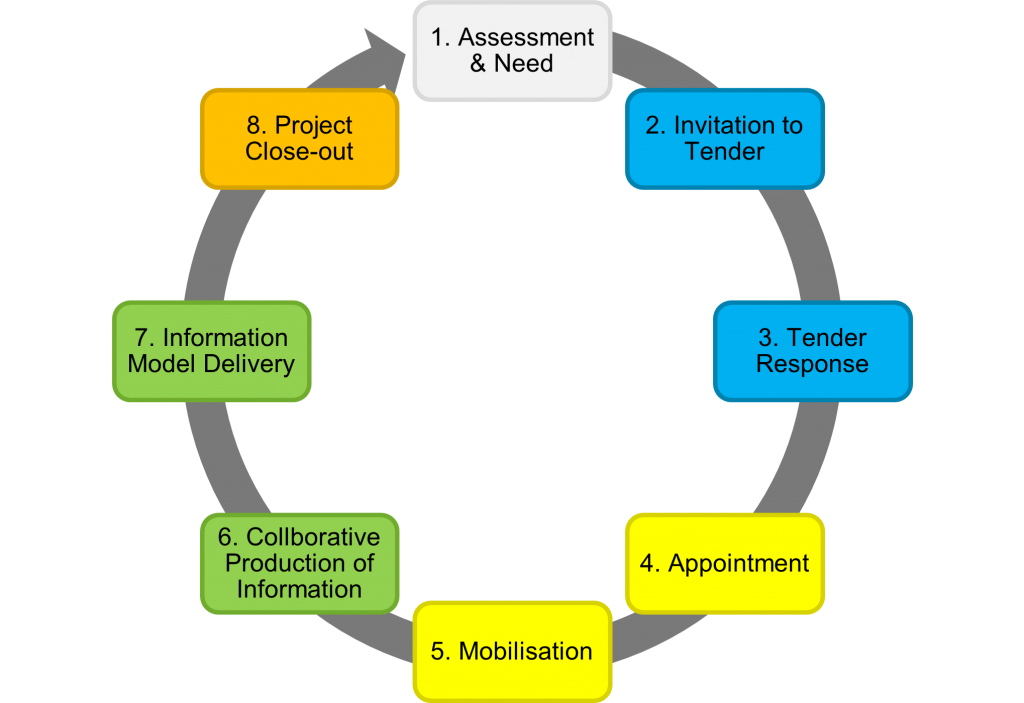
ISO 19650-2 defines a structured process for the delivery of built assets known as the information management process. This process has 8 stages starting from the initial assessment and concluding on project completion as seen in the following image:
It’s important to note, some stages may be repeated for each appointment (contract) of the project and the lifecycle is not a simple linear relationship. For projects with multiple appointments (i.e., different lead appointed parties for design and construction) stages 2 to 7 are repeated. Whilst stages 1 & 8 occur only once per project.
There are three phases within the information management process. The procurement phase (2-3), the planning phase (4-5), and the production phase (6-7). You’re probably already familiar with the project delivery and asset lifecycle. But ISO 19650 introduces new terminology to globalise the standard.
These 8 stages are summarised below. For a comprehensive overview of ISO 19650, read The Ultimate Guide to ISO 19650 by 12d Synergy here.
1) Assessment & Need
The appointing party (E.g., the client) determines why works are to be carried out, an example for this could be to improve a highway’s capacity. They will also need to establish the project’s information requirements, information standard, and project milestones which are compiled into the PIP.
2) Invitation to Tender
The appointing party then establishes their tender response evaluation criteria, so how all bids will be assessed and judged. Once the evaluation criteria are finalised, they will issue a tender inviting organisations to formally bid for the works.
3) Tender Response
Prospective delivery teams (E.g., engineering consultants or contractors) prepare and submit a response showcasing and demonstrating their approach to the works. The response should also assess their capability and capacity for the job. This is outlined in their pre-appointment BIM Execution Plan (BEP) and Risk Register.
4) Appointment
Tenders are evaluated and the successful delivery team is selected, known as the lead appointed party. The team now undergoes detailed planning and prepares a schedule outlining how and when items will be completed to meet the appointing party’s Exchange Information Requirements (EIR) and information delivery milestones.
5) Mobilisation
The lead appointed party ensures they have the right people, processes, and technologies in place to deliver the works. Teams are trained up if needed and the Information Production Methods and Procedures are tested and documented to ensure they are appropriate for the works.
6) Collaborative Production of Information
Works begins and information is generated, coordinated, checked, reviewed, and approved by the lead appointed party. Each appointed party (task team) within the delivery team may represent a different discipline on the project (E.g., road design, geotechnical, electrical) and once their information has been approved, they can share to other teams for reference and coordination.
7) Information Model Delivery
The appointing party reviews the information model against their acceptance criteria and either approve or reject it as a contractual deliverable. This is repeated for each milestone and information delivery on the project until the appointment is completed.
8) Project Close-out & Asset Information Model Aggregation
Once all appointments have been completed, the information is archived and aggregated into the AIM for the ongoing operation and maintenance of the asset.
Information Generation, Coordination, and Federation
The production phase or steps 6 & 7 in the information management process are crucial in terms of maximising resources and eliminating those wasteful tasks mentioned previously. This is where a CDE comes into play.
It’s the technology that enables the ISO 19650 information process. A collaborative platform which once information containers (i.e., files, data, design, models) are produced, it can be managed and shared within this system.
The onus is placed on the appointing party to implement and manage a CDE on the whole project, however it’s unlikely that there is only one CDE which manages everything in the project. Each lead appointed party may be responsible for managing their own CDEs for their appointed parties. The CDE is likely to be an ecosystem of integrated IT system rather than a singular product.
CDEs can include data management systems (like 12d Synergy), geospatial information systems, and engineering management systems.
ISO 19650 states that information within a CDE should be:
Created once and re-used many times, eliminating any future rework and wasteful tasks. There will be newer versions of information that will constantly be updated until approved.
Continuously shared and trusted amongst team members. Approved information can be used as reference by other teams.
Have a clear auditable history, identifying where the information came from, who amended it, and when this was done.
Checked, reviewed, and approved before it is shared with other team members. The information should be authorised at each level. This must occur within task teams, before the delivery team, and finally with the client.
The state of the file within the CDE workflow needs to be clearly identifiable, along with its revision and status. Access should be controlled accordingly depending on who the team member is.
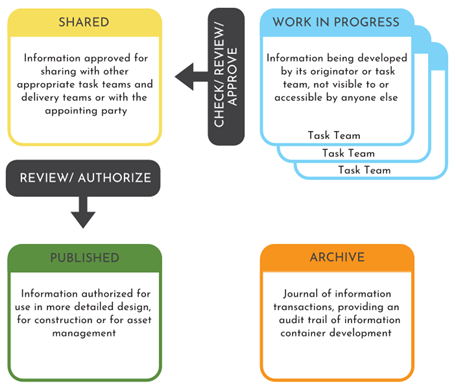
The CDE workflow organises the flow and management of information across the whole lifecycle of an asset across four states: Work in Progress (WIP), Shared, Published, and Archived. The process can be seen in the image below:
Work in Progress (WIP) (Creating Information)
This stage is where information production occurs by task teams. Files are editable and are unapproved for sharing with the wider delivery team. Access is controlled by the CDE to prevent other task teams from working on, referencing, or issuing draft information.
WIP to Shared (Information Coordination)
WIP information is shared with other task teams after passing a QA check and technical review. Shared information is not approved as a deliverable but approved to be shared with other members of the delivery team.
Shared (Coordinated Information)
Shared information is information that has been verified to be shared with the delivery team. Shared information is read-only and must be the most current approved revision of the information container.
Shared to Published (Information Delivery)
The information is then approved internally for publishing with the client. Publishing occurs for each information delivery milestone.
Published (Information Deliverable)
Published information is information that has been reviewed and authorised as a deliverable by the client. It is read-only information and must be the most current authorised revision of the information container. Published information is accessible by the entire project team.
Archived
Once all delivery milestones have been met and all appointments have been completed, the information model is aggregated and archived to enable the ongoing operation and maintenance of the asset. This ensures there’s a definitive final version of project information available in case it needs to be referred to by the client, after the project has been completed. This is read-only information and only visible to the client and the CDE administrator.
Now, this is an extremely brief overview. There are more key concepts, principles, and processes of the standard. To learn more about ISO 19650 and all its details, check out 12d Synergy’s comprehensive overview of the series: The Ultimate Guide to ISO 19650 by 12d Synergy.
The 12d Tech Forum 2021 involved a veritable cornucopia of incredible presentations, showcasing what 12d products can do.
One of these amazing talks was delivered by Grant Wandel, a Surveyor and Civil Designer with Southern Land Development Consultants in New Zealand. Working on a broad range of infrastructure and development projects globally, Grant is responsible for leading the design of civil infrastructure for Southern Land in Wanaka, New Zealand. Grant has used 12d Model throughout his career, and in recent years has been using 12d Synergy as well.
Watch the recording
Southern Land is a team of land development and subdivision consultants with offices in Auckland, Wanaka, and Queenstown. Grant demonstrated how such teams can work from anywhere in the world to deliver land development projects from end-to-end using 12d software.
The Project
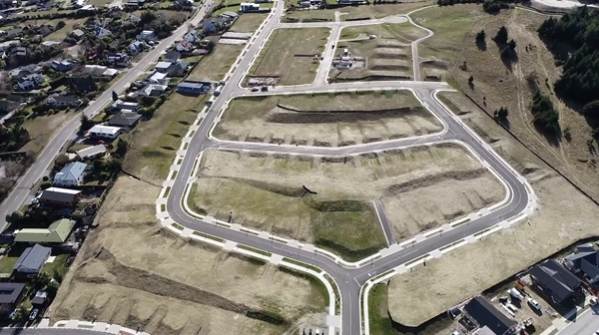
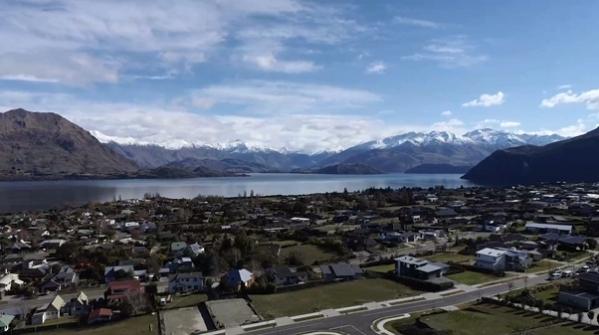
Aerial photo – Clearview Wanaka
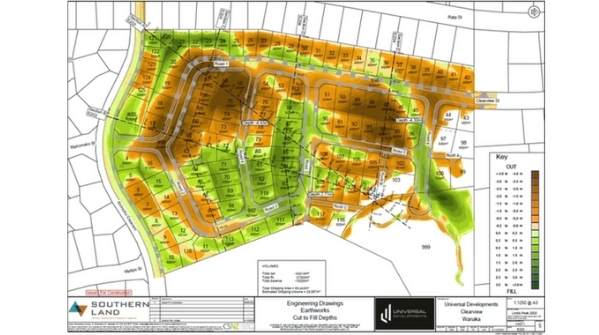
Clearview Wanaka involved 119 residential lots and around 40,000 cubes of earthworks. The team had to do ‘a bit of everything’ on this job – drainage, sewer, stormwater, service reticulation, earthworks, tricky site management controls, etc.
Southern Land was responsible for:
Lot Layout/Scheme Plan Design
Civil Design Package
Contract Administration
Environmental Management
Construction Observation
Set-out/as-built survey
Land transfer survey.
They used 12d software for the complete project:
12d Synergy – project creation
12d Model – from concept through to completion12d Synergy – project delivery.
Working Remotely
The 12d Synergy Sync Tool was used to manage all 12d Customisations throughout their offices by pushing out all nodes files, User Library files, feature code libraries, updates, etc. to any of their 12d users’ C Drives, from anywhere in the world.
Working remotely became especially important to Grant during this project. He actually did most of the earthworks and civil design from an apartment in Slovakia! This incredible freedom to be able to travel, when necessary, but be able to continue working, was a real game-changer. And once the pandemic hit, needing to work from home became vital for their other staff as well. The flexibility offered by this has revolutionised the way they work.
Automation All the Way
Southern Land has been developing their 12d Synergy workflows over the past few years. Their data gets pushed into 12d Synergy as Attributes, which are used all the way down to plotting and drafting, as well as for reporting. Their documents and templates come out of 12d Synergy automatically saving an incredible amount of time. This project had up to 80,000 file changes and so certainly needed to be properly tracked! 12d Synergy also proved to be invaluable for sharing out 12d Model projects.
12d Model’s dynamic design capabilities have been vital to Southern Land on this project. Grant spoke of 12d Model helping them to be adaptable to the changes that inevitably happen throughout a project, and because they’ve been able to automate so many of their systems, not let drafting time impact this.
12d ‘From Go to Whoa’
Southern Land produced the full civil design for the project with 12d Model, including scheme plans, road and earthworks design, drainage, dynamic stormwater modelling, and multi-page plots.
Using 12d Model, Southern Land created superTINs from topographic surveys (from a variety of sources), UAV Imagery, and LiDAR Point Cloud Data from their local Authority.
The team utilised many other tools within 12d Model for design and surveying including the 3D Viewer, lot labelling in Estate Lots, CAD Tables (very handy to be able to update something within a CSV file and then recalc that CSV file in a table on the plan face), and Chains to automate drafting as much as possible.
Earthworks and Roads
Earthworks from the project
Southern Land’s use of 12d Model’s Alignment Computators meant their alignments were ‘talking to each other’ – that is, if they adjusted one alignment, the elevations would all change around. This was another huge time-saver for them.
Grant has three MTF/Snippets that he’s customised from what comes ‘out of the box’ with a few edits for their local Authority to help them build a road design very quickly.
The Pavement Manager tool in 12d Model also proved very useful. It creates trimeshes so Visualisation works automatically, and the trimeshes used to run quantities for scheduling.
Chains were employed again, for roading and earthworks design, and generating plots. This continued automation of drafting meant that Grant could apply Attributes within Snippets to automate the drafting of any changes he made (change of kerb type, automatic label, label map file, labels at kerb type, etc.).
Once all these systems were up and running, when a change was made, not much else had to be done except run the Chains. This saved a great deal of time.
Visualisation
The view over Lake Wanaka
With the Trimeshes (straight out of Pavement Manager), Southern Land could perform all their drainage modelling through the Drainage Network Editor, with no extra effort required to get their Building Platform Visualisation up and running and have things looking great.
The view on this project was amazing, and the team needed to show prospective purchasers what aspect they were going to get from their lots. By exporting KML to Google Earth, prospects could pan around in Google Earth and easily see views from their lots. Most of it was automated so Southern Land didn’t have to spend a lot of time to get something that looks fantastic.
Clash Detection and Augmented Reality were also useful – Southern Land tested this with roading Trimeshes and drainage networks and were able to see clashes underground before putting the pipes in the ground.
Drainage
12d Model’s Drainage tools are incredibly powerful. The Southern Land team first used the Rational Method for all their pipe sizing, and on this project, there was a centralised stormwater attenuation system and Dynamic Analysis was run against this.
Grant said it was great to have all these features in one software package – they could do all their drafting, update a road or surface and rerun dynamic calculations to compute invert level changes, tweak orifices and weir elevations, check heights needed for an overflow, and much more. Being able to tweak the model without using any other software really sped up the process in this stage of detailed design.
The team also used 2D Roadflow to do overland flood analysis and automated calculations and graphs for reporting, and again relied heavily upon 12d Model’s capabilities for automated drafting, at the click of a button, to assist with their drainage design.
Multi-Page Plots
So how did they bring all this together onto a plan face? What the contractor and the Council were going to see was all dependent on plotting. The answer was 12d Model’s Multi-Page Plots.
The team found View Favourites particularly useful when it came to plotting. In addition, they again utilised 12d Model’s automated drafting tools for dynamic dimensioning, dynamic leaders, string attribute labels, etc. They also found the Drawing Register vital for keeping track of where revisions were in the project.
For this project they had 57 sheets in their final “Issue For Construction” set, so the ability of 12d Model’s Multi-Page Plots to plot by chapter or even individual page, instead of having to go through the whole sheet, was another massive time-saver. ‘Combine PDF Files’ was invaluable for updating single sheets in an existing set.
Construction Preparation, Machine Control and QA
Quantity calculations were automated as well as scheduling. 12d Model also produced all Southern Land’s Machine Control Files and survey setout data.
A great deal of Quality Assurance (QA) had to be performed throughout the project, and 12d Model assisted with this. For their MDM compaction tests, they were able to convert to CSV in 12d Synergy, then read this straight into 12d Model through Attributes.
As-Built Data
Their local Authority no longer takes AutoCAD files but instead uses GIS data or 12dXML. The team used 12d Model’s Attribute Manipulator to convert the as-built survey data into the attribute format required by the Authority and then wrote out an 12dXML file.
They were able to do a lot of the Attribute mapping from their already QA’d data they had checked throughout the project. Not having to recreate this data in any way saved a lot of time.
Land Transfer Survey
Southern Land does all their land transfer surveys from 12d Model. Their Land Transfer Data Preparation is all produced in 12d Model’s Traverse Spreadsheets and uploaded to LINZ. Being able to do all the prep in 12d Model was particularly useful for checking the cadastral surveyor’s precalcs in advance, and shared models were used across the design project to see where pegs will land, in order to work out any potential clashes during construction.
Document Control and Remote Data Access
How do you deliver this volume of data to the right people? How do you keep track of it? For Southern Land, the answer to this question was simple…12d Synergy.
For project delivery, the Issue Files functionality was very useful as it’s great for large document transfers, and automatically keeps track of document control through Document Transmittals. Grant said issuing file sets really helped the process when they had multiple projects running and were trying to remember which data had gone out. It became so easy to check.
Using 12d Synergy templates with pre-populated attributes and having a single point of entry drastically reduced administration time, especially in the cases of inspection reports and completion certificates. All the data came out of the Attributes from within 12d Synergy.
The Takeaway
As a civil designer for this project, Grant was incredibly happy with the way 12d Synergy and 12d Model worked seamlessly together – the team could automate everything, make it adaptable, and limit the time spent drafting.
This project was mostly completed during a six-week lockdown and an eight-week trip to Europe. Being able to work from anywhere created flexibility that would have been beyond imagination just a few years ago.
To learn more about working remotely with 12d products, and much more, register for the On-Demand 12d Tech Forum 2021 at https://12dtechforum.com/.
I caught up with Sharleen Cole-Swami of 12d NZ this week to chat about the updates made to Traverse Spreadsheets in 12d Model 15.
There are updates that have been added to make people’s lives easier, and updates that have been added in response to some new Cadastral Surveyor Rules implemented in 2021.
In this informative session, Sharleen provided a brief introduction to the 12d Model 15 interface, and to Object Tree, then delved into all things Traverse Spreadsheets. This included such updates as the Bearing Correction and Show Description tick boxes, plus additions to the Data, Observations, Points, and Parcels tabs of the Traverse Spreadsheet Parameters panel (mostly due to the addition of Object Tree into 12d Model).
This session will be of particular interest to Surveyors in New Zealand, so we encourage you in particular to watch this video.
ARVE error: Invalid datetime: Traverse Spreadsheets: What's New in 12d Model 15
Bill Syme (TUFLOW Software Lead at BMT) and Rob Graham (Water Resources Engineer at 12d Solutions) presented a fantastic talk at our recent 12d Tech Forum 2021, detailing exciting new features in TUFLOW software, and their integration into 12d Model:
TUFLOW’s implementation of Sub-Grid Sampling (SGS) and Quadtree grid refinement produces quality results without the need for a small cell size throughout the entire TUFLOW grid. 12d Model 15’s integration with TUFLOW includes both features.
Both Sub-Grid Sampling and Quadtree Meshes have really allowed TUFLOW to improve how they model not only urban areas but also rural catchments – it’s been a real game-changer for hydraulic modelling of surface flow.
In his presentation, Bill also touched on advances in non-Newtonian dam break studies, and on TUFLOW’s work with Modelling Bridge Decks, a joint research exercise with the Department of Transport and Main Roads, Qld (TMR).
In a recent LinkedIn article, Duncan Kitts (UK/Europe Software Lead at TUFLOW) wrote about the 2020-01 release of TUFLOW and its host of exciting and ground-breaking functionality including SGS and Quadtree Mesh. We’ll include some of Duncan’s thoughts on this page, too.
What is Sub-Grid Sampling?
Image: Sample elevations at fine resolution across whole cell Source: https://megamanual.geosyntec.com/npsmanual/waterqualityswales.aspx
These days, both aerial and terrestrial LiDAR data are available in increasingly high resolution, but the vast majority of the information is not commonly used in hydraulic modelling.
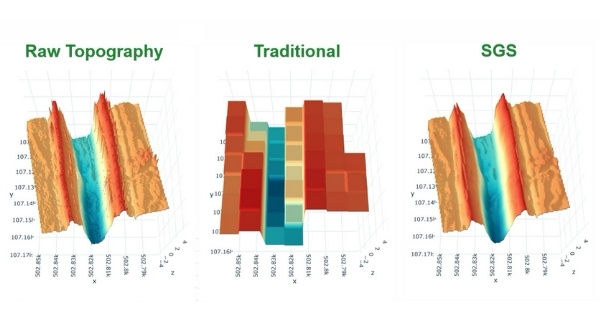
2D hydraulic modelling software such as TUFLOW will traditionally sample the underlying digital terrain model (DTM) by taking the elevation measurement at the centre of the cell (as well as cell face midpoints in TUFLOW’s case), or by taking an average/minimum of the underlying DTM elevations as the cell elevation. 2D hydraulic model grid cell sizes are usually 2-10 times the size of available DTM cell sizes, so the sub-grid scale topography that may be present in the DTM is not utilised within the 2D hydraulic model.
Improved representation of detail within open channels is one of the reasons that one might choose to represent open channels using 1D hydraulic modelling, or use flexible meshes, both of which are significantly more time-consuming to set up correctly compared to a regular fixed grid.
With SGS, rather than using a single elevation value for the grid cell elevation, underlying DTM cell elevations can be used to determine a water surface elevation vs volume relationship for each grid cell. A similar action is performed along the cell faces, resulting in the full array of information in the DTM still being utilised within the 2D hydraulic modelling despite the hydraulic model grid resolution. This improves the representation of the underlying topography and the accuracy of simulated results.
Traditional Approach vs SGS Approach
Traditionally, surface area would be broken up into cells, and the elevation data associated with a cell would be extrapolated through sampling a single elevation from the centre to create a square tub that holds water. From there, to see how the water moves around from one cell to the next, a single elevation in the middle of the cell side would be sampled, and a flat rectangular section used.
Often this coarse representation of the underlying Digital Elevation Model (DEM) or Triangulated Irregular Network (TIN) would miss out key features.
With the SGS approach, however, sample elevations can be taken at fine resolution across each cell – across the whole cell. Instead of a single point, a relationship or curve can then be generated. This is effectively the cell volume with height, and the flow area for each cell side. This method provides a far better representation of what’s inside the cell – i.e. a much closer representation of the DEM or TIN.
Benefits of Sub-Grid Sampling
SGS improves flow depth estimation accuracy at stormwater pipe network inlets, and increases the accuracy of flows entering stormwater pipe networks.
The previous way of dealing with the issue of coarse resolution – using very small cell sizes – caused very long run times and large output files.
With SGS, we get:
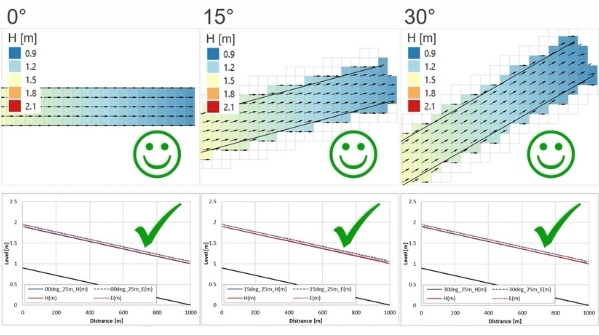
Consistent results for different cell sizes, meaning we can use larger cell sizes, giving faster run times
Consistent results for different orientations (i.e. you no longer have to align the grid/mesh with the gutter)
No need for gully lines (can now be detrimental)
More accurate inlet flow capture
Elimination of numerical loss effects associated with oblique, coarsely represented steep-sided channels leads to improved above-ground result accuracy.
More accurate representation of above-ground topography means faster stimulation as models can be built using larger cell sizes.
We also see improved flow depth estimation accuracy at 1D inlets, which leads to more accurate storm water network results.
In addition, by using the underlying sub-grid scale topography, it is possible to more accurately represent the potential storage and conveyance within the system being modelled.
The use of sub-grid sampling can also assist with model calibration and is particularly useful for whole of catchment direct rainfall models.
The amazing benefit to modellers and workflow efficiency is that the modeller can calibrate a model and the calibration can still be valid when grid resolution is changed.
What is Quadtree Mesh Refinement?
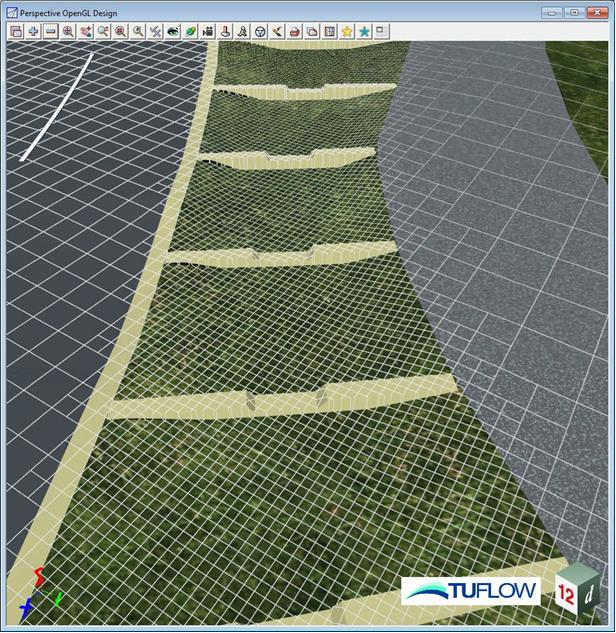
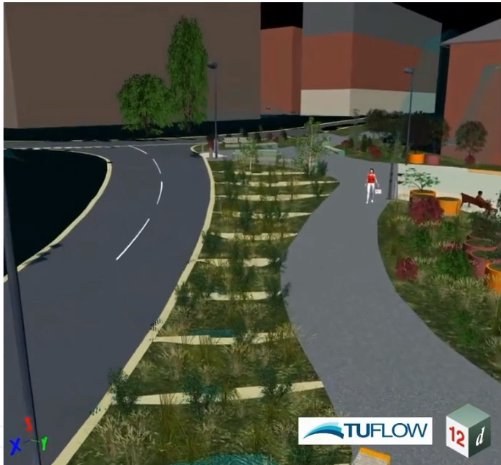
The Quadtree grid shown here for the Water Sensitive Urban Design (WSUD) device refines in two simple steps – from the road/path straight to the detailed grid in the WSUD device.
Quadtree is the simple concept of splitting one 2D cell into four, over and over again – allowing your 2D model to have variable cell sizes based on subdivision of your square cells, down and down. With Quadtree, you can refine your model resolution whenever and wherever you want, to achieve improved accuracy.
Quadtree is very easy to set up – this can be done either by using existing polygons like a road layer or by drawing polygons to define nesting and giving each polygon a level or resolution. Currently Quadtree can accommodate up to 9 levels to nest down into, one level at a time (more than enough for everyone who’s used it so far). If you want to skip one or more levels, Quadtree even automatically transitions.
With the inbuilt automated level approach, you can simply skip to the desired level and TUFLOW will auto-buffer one cell for each skipped level.
The advantages of Quadtree are, among others, that it allows you to get refined results where needed, it’s very easy to set up, and it provides faster simulations due to fewer 2D cells (run times typically decrease by 2 to 5 times). Quadtree also enables refined representation of topography features and hydraulics where the user desires.
So far, no disadvantages have been found unless run-times increase because your non-Quadtree model is at a different resolution.
SGS + Quadtree Combination
In the urban world, the capturing of inlet flows is far more accurate, plus we achieve higher resolution modelling (in terms of flow patterns) with these two combined. This means we can be much more realistic with our modelling. It’s a real game-changer.
With sub-grid sampling, despite using larger grid cell sizes, the underlying topography is still used. Results using coarser grid cell sizes and SGS are comparable to those using a much finer grid cell resolution at a fraction of the computational effort, and data storage.
Used in conjunction with TUFLOW’s Quadtree solver to allow the user to focus detail where required without compromising computational efficiency in locations of little topographic variability, SGS can be used to ensure areas of coarser grid cell resolution, still providing the necessary detail for robust 2D hydraulic outputs.
SGS and Quadtree into 12d Model
How does 12d Model implement SGS and Quadtree? Boundary Polygons wrap a polygon around a set of strings in a view.
Then in RoadFlow, we enter the TUFLOW road extent and set the SGS frequency, plus specify the Quadtree model. Roadflow also handles AR&R storms.
Non-Newtonian Dam Break
With non-Newtonian flow, fluid no longer behaves like water – viscous characteristics change as forces are applied. For example, tailings can liquify when subject to gravitational forces from a dam failure, and paint becomes thinner as you force it with a brush.
These events can now be simulated in TUFLOW. AS always, results may be animated using 12d Model Visualisation via Timelines.
Modelling Bridge Decks
This has always been somewhat problematic.
TUFLOW, together with TMR Queensland, set out to find a way to improve bridge deck representation in flood models to reduce uncertainty of hydraulic model results, leading to better bridge designs.
To do this TMR have been doing a range of modelling – CFD (incredibly high resolution) and TUFLOW, as well as other benchmarking and comparison testing using measured data.
Conclusion
SGS and Quadtree combined have become a real game-changer for urban modelling. This approach is allowing users to really drill into detail to model roadways, round-abouts, channels, SUDS and WSUD features, in detail and with fine resolution.
Inlet flow capture is much improved, and in terms of modelling roads and gutters, it really does help enormously as well.
I caught up with Dylan Revell of 12d NZ to talk about working smarter with the 12da Library.
The 12da Library is an option in 12d Model software that can be used in many different ways. Whether it is used as a quick way to import and place complex 12d Model items such as water models or 3d objects, or simply as a quick creation library for drafting and plotting options like standard details, typical sections and more, this webinar will cover some of the ways that the 12da Library can help you work smarter.
Items covered included setting up and using the 12da library to import and edit 12d objects, adding details to cross section plots, and of course using the library in conjunction with MPS plotting.