12d Modellers on 12d Model

It’s always exciting to see the innovative projects that 12d Model is being used for. From the Parramatta Light Rail from to the West Gate Tunnel down in Victoria, seeing 12d Model in action is always illuminating for us as it is for other industry professionals.

One of the most useful things is finding out what features drafters and designers value best. Here’s a roundup of some of the feedback we got, from the people actually using our software…


Seb Woodland, GHD

I like the Computators and the way we can form parametric designs and really get a lot of design intent into the model, rather than just a 3D drafting type exercise.

Lane Irwin, 12d NZ

In 12d Model 14 for surveyors, definitely the plotting is going to make things a lot quicker and a lot easier. With the new 12d Field formats, just having a tree format will be absolutely fantastic, as well as more CAD options and things like that.

Carly Smith, Alexander Symonds

Personally, I love Visualisation. I used 12d Model a lot for a wind farm project, so we were able to plot out the turbines and then optimise the area and put in the roads, and it was great to fly through and see that all in visual.

Peter Murray, Brisbane City Council

I’ll go across all of the features, but the survey stuff is where I’m based. The new 12d Field is what I’m particularly interested in at the moment.

Dean Ostrofski, City of Gold Coast

Probably, the biggest benefit is the way 12d Model interfaces with a survey to design, then back to survey for construction set out, and now with the BIM capabilities, it’s fantastic. Visualisation has always been there, which is tremendous in being able to show our clients what we’re doing at an early concept stage before we go into the details.

Derek Roberts, Calibre

It’s probably starting to focus, the biggest one. There is probably the one point of truth. A lot more people are using it as a preferred software package, so it’s made it a lot easier to handle things and make changes and integrate with other software through common procedures.

Phil Weightman, Byrne Consultants

One of the features I particularly like is that everything keeps evolving within 12d. So that’s one of the great things, but I love how it’s starting to move into some of the object-oriented design space and how it’s keeping pace with the industry and also almost being on the leading edge of industry as well.


One thing we are certainly committed to at 12d is continually evolving and improving all of our software, to meet and exceed industry needs.

Going forward, we think the new user defined menus are going to be a game changer. There’ll be a nightmare for our support people because they won’t know what they’re going to be dealing with!  But I think a lot of users want to be able to customise 12d Model and chop it down for different applications.  We’ll still ship it with everything, but they can then define their own menus, top menu, side menu.

Ultimately, the future is shaped by our users coming and saying what they need that will make their life better. It might be some great big thing.  But it’s often the incremental changes that make the difference, such as cutting a task time from ten hours to one hour.


The Attribute Manipulator in 12d Model

Paul Hardwick of 12d Queensland addressed our 2018 Technical Forum audience about the Attribute Manipulator in 12d Model software.

Paul said this option has progressed a lot since 12d Model 11, and it has filled the hole of a lot a macros that have been written in the past, combining them all into one nice, easy-to-use option. It continues to grow in response to customer requests – expanding as more people want attributes, and more people want to do more things with attributes.

He showed examples of some attributes that can be easily worked with using this feature of 12d Model, declaring that, “It’s a very handy tool for a lot of different things.”

Updates to the Attribute Manipulator in 12d Model 14

New Rule Type Menu

The names of the items on the Rule Type pop-up menu have been modified as many items now apply to more than just string elements. The new names should make it more obvious which elements the rule will work for.

Str/Tin/TRm Attribute Menu

The Attribute Rule has been replaced by the Str/Tin/Trm Attribute Rule as the option now works for String, Tin, and Trimesh attributes.

New Choices for what Happens to Attributes

• Set the attribute path name to all upper case
• Set the attribute path name to all lower case
• Set the attribute to the GUID for that place and time

New String/Tin/Trm Properties

• Time the element was created
• Time the element was last updated
• Colour of a Trimesh
• Surface area of a Trimesh (all sides)
• Volume of a closed Trimesh
• Justification point of super string pipes

New Vertex Properties

• Colour of the water string node
• Modify the X, Y, and Z values
• Modify Point IDs

New Segment Properties include line style of a segment.

Concatenate Attributes

A real time-saver. For packages that can’t handle attributes, this gives the ability to concatenate attributes down to one thing, e.g. string name.


All in all, the Attribute Manipulator is an exciting feature in 12d Model that continues to grow, saving users time and money! Watch the full video of Paul’s presentation for more information!

Public Works Standards

Tim Brooks (and Owen Thornton) of 12d Queensland addressed our 12d Technical Forum 2018 audience about Public Works Standards.

Tim is the 12d Model and 12d Synergy Training Manager, and has been with 12d Solutions for around 5 years. He coordinates and writes 12d Model training manuals, and writes the 12d Synergy Training manuals. A Civil Designer with 20 years’ experience in the Civil industry both around Australia and in the UAE, Tim has worked on a variety of civil projects including Motorways, Highways, local roads, Industrial and Subdivision estates, Carparks and Rail projects.

Changes Coming to 12d Model 14 setup and Library files

Those who were around for the previews of 12d Model 11 (at the 2014 Conference) may recall that 12d did a lot of work on the files that were shipped with that version.

As part of an initiative by the IPWEAQ, in conjunction with 12d, all those files have now been developed further, to form what we are calling the Public Works Standards.

Towards the end of 2016, 12d (represented by Tim) started meeting with the IPWEAQ Councils and assist in making their dream of a common standard become a reality.

The IPWEAQ had been meeting before this, but hadn’t ventured into the actual customisation too much other than their own councils having their own methods, and sharing these with each other.

There are two main groups in operation – one for Survey and one for Design/CAD.

The biggest item discussed at these meetings was the names.4d file, as well as the string coding and model naming within it. From there, attendees went through what was required for outputs – for DWG, what the plotting of long- and cross-sections should look like, etc. All these items came together either by councils submitting their own examples or 12d providing examples and getting feedback.

Standards/codes have been kept generic to suit all locations. There has been positive feedback so far – we’re starting to get people using this in other states, and in New Zealand. The pursuit of a common standard seems less of a far-off dream than it once did! Tim even had an article published in the IPWEA magazine last year – ‘Creating a Common CAD Standard’.

So why do this?

Tim asked the audience…who here develops 12d Model standards for own company? Many answered that they did. He went on to ask such questions as:

Who has time to maintain those standards?

Who has the budget to maintain them?

Who actually likes developing these files?

And determined that this task is difficult and time-consuming for most of those charged with it, and that a better way forward is desired. In fact, some companies don’t even have a 12d Champion to develop these files, so they’re in even greater need of this. This is particularly prominent when there are issues with different requirements for projects that span over different authority borders – whose standards are used then? Something has to change. Enter 12d.

New Public Works Standards in 12d Model 14

All these new standards will come with 12d Model 14, out of the box:

  • Setup Files
  • Names.4d
  • Colours.4d
  • Linestyles
  • Symbols
  • Defaults
  • Plotter
  • Plotter map files
  • Library Files
  • CAD dwt and acadmf
  • PPFs and associated files
  • Various mapfiles, macros, etc.

The Survey and Design/CAD groups will continue to meet into the future and agree on any additions/changes to keep this process improving.

Using the new Standards in 12d Model 12

If you wish to use these standards in 12d Model 12, there’s now a location on the 12d Model User Forum so you can download these put them in your 12d Model 12 user folders.

Providing Feedback

Users can provide comments on the User Forum (but any changes will go through the Survey and Design/CAD groups for final approval).

Future Directions

There are still some more files to be added.

For Survey – Tim, along with Paul Hardwick (also of 12d Queensland), have been working with councils in Queensland to update survey mapping files, macro to transfer to 12d Field Codes, label mapfiles, 12d Field codes, and style sheets for post processing.

For Design – we’re also looking at updating the Snippet template library to include template snippets that match the IPWEA standards.

Documentation for Public Works Standards

This is being worked on currently and should be available in the near future. Documentation will include:

Survey manuals/procedures

CAD/Design manuals/procedures

We’ll upload them to the 12d Model User Forum when they’re available. Also, the IPWEAQ should be making them available through their website.

Public Works Standards – Plots

Owen Thornton has a keen interest in the Plot Parameter File (PPF) development in 12d Model. His section of the presentation focussed on new Plot Parameter Files and new PPF Features in 12d Model 12 and 12d Model 14.

Owen has been writing software for 12d Solutions since 2003. He has 20 years’ professional experience in the civil and mining industries. He is the original author of the 12d’s Drainage Network Editor and the Drainage Analysis module and is a 12d specialist in drainage, utilities, plot parameter files, survey conformance, volumetrics and system setup. Owen also has consulting experience using 12d Model on a variety of design and drainage projects, large and small. These days, Owen runs regular 12d training courses in drainage design, geometric design for water resources, customisation and macro writing.

He provided a ‘highlight reel’ about the particular part of the Public Works Standards that covers PPFs, and also some new PPF features for both 12d Model 14 and 12d Model 12.

PPFs for Public Works are already installed in 12d Model 12, and Owen said the new features in 12d Model 12 are working very well.

The extent of Public Works PPFs is long- and cross-sections for roads, as well as long-sections for pipeline and drainage/sewer.

Out of all the PPFs installed with 12d Model, the ones that are new to 12d Model 12 and 12d Model 14 were highlighted in Owen’s talk – he said the files with ‘PW’ in their names are associated with the  Public Works Standards.

Staggered Uprights for Cuts Labels

Owen’s favourite of the new features. For every PPF that has a Cuts branch, there’s a new position mode called ‘Above top of boxes staggered’. With this, Cuts annotations may now be positioned with staggered uprights that extend down into the boxes area.

All the new ‘PW services’ PPFs have a dedicated space on the plot for this service and utility data.

This means no more clashing text! We’ve ‘Banished the Drafting Demon’ here.

Staggered Uprights for Cross-section Points

Similarly, for cross section plots, Staggered Uprights now exist.

Design string names at cross-section points may also now be positioned with staggered uprights that extend down into the boxes area.

Long-section Super-elevation Diagram

Greatly improved yet simplified, with new mode and super rotation rate tolerance – a parameter related to the design of the road; users can work out and pick a number that suits the kind of super elevation applied to the road, in order to pick out the flat spots in the diagram for labelling. Users can also label chainages at zero xfall.

Feedback on this has been very positive so far.

Long-section Datum Shifting

  • Automatic datum shifting controlled from the Graph area branch
  • Extra space parameters have also been enhanced
  • Parameters for deciding when it can break the datum.

Public Works Standard Drainage and Sewer Long-sections

This one is quite specific to Queensland, but if users don’t have any standard to use, this could be used as a basis.

We submitted all these for review by the IPWEAQ – we got feedback and modified some parts slightly, but essentially we’re all on same page.

Public Works Standards in 12d Model 14 only

  • “Black Pen” colours sorted by PMF Pen Weight
  • This is new in 12d Model 14
  • “Black pen” screen colours have been coordinated across colour groups
  • Owen has created a handy reference for use while getting used to the new arrangement
  • Hard to implement but worth the effort.

New plotters and Plotter mapping files have been included in 12d Model 14, to meet the Public Works standard.

We haven’t gotten rid of the old ones that worked well to a different standard – they’re just grouped under Legacy now.

Other New items in 12d Model 14

  • SUI (Subsurface Utility Information) colours
  • Raster overlay colours
  • Contour colours for black screens and white paper/PDFs.


Watch the full video today to see more of what was presented on this topic!
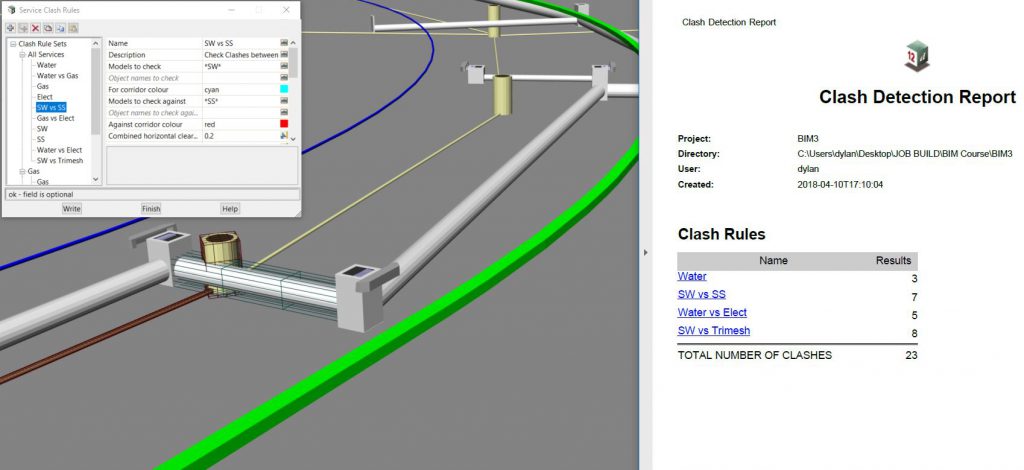
Drainage and Object 3D Clash Detection in 12d Model

Recently, we replayed another of our most popular webinars from 2018, ‘Drainage and Object 3D Clash Detection in 12d Model’. This session was presented by Dylan Revell of 12d NZ.

Not only does 12d Model allow its users to create comprehensive 3D and BIM Models of surveys, road designs and water modelling, it also provides tools for users to analyse and check the effect of these models spatially against one another.

This webinar will cover tools for users to visually identify, report, and process 3D model interference or ‘clash’ occurrences for tins, strings, and trimesh objects.

Please note that this will be a live replay of a very popular webinar held in June; attendees will be welcome to ask questions during the presentation and these will be responded to by email after it finishes.

Watch the video now to hear more about this great topic!

Precise Culvert Length and Location with Drainage Strings

We started off this year’s 12d Training Webinar Series with a replay of an extremely popular topic from May – ‘Precise Culvert Length and Location with Drainage Strings’. This topic was presented by Owen Thornton of 12d Queensland.

This session demonstrates how to align and grade a Drainage string culvert with precision, in both the horizontal and vertical, to best suit the batter slope of the road it crosses and to allow for an integer number of pre-fabricated pipe/box lengths.

Plan and long-section plots of the culvert are produced. The culvert and its headwalls are also converted to trimeshes, for use beyond hydraulic modelling, e.g. road design and BIM.

To see this in action, watch the video today!

12d International Technical Forum 2018 – Thoughts by Lee!

The 12d 2018 Technical Forum was a wonderful way to crown a record-breaking year for 12d Solutions. We had well over 500 industry professionals from survey, construction and design, and data management join us. All the seats were taken up – we were literally bulging at the seams, with standing room only.

It’s always fantastic to see the innovative ways that customers use our products. They often find applications that we had never thought of. We see people using certain features over and over again: features which even the developers had never imagined being that important.

Getting to grips with BIM

BIM was the major discussion topic at this year’s conference. The majority of presentations addressed how different companies are dealing with BIM, especially from the civil engineering point of view. Most AEC professionals have had it rammed down their throats about vertical BIM and buildings. But now they’ve really shown how they know what civil BIM is all about, and how Australia is leading the way because most people aren’t doing it around the world.

We’ve seen fantastic projects where everything’s been done inside 12d Model, modelling everything, federated models, clash detection, the whole lock, stock and barrel. So people from all over the world are coming to Australia to take a look and see what our users are doing here.

As Richard Russell from Arcadis put it: “You don’t have to be a 12d user to come here and get value from the conference. Currently in the industry there’s a lot of talk about BIM and where BIM is going, and a lot of misinformation out there. The 12d Technical Forum is a really good place to properly understand what the software is capable of, and what’s been done for years already. We’re not trying to reinvent the wheel.”

Fast-growing 12d community

2018 has seen record sales of 12d Model, as well as record numbers of people coming to training. 12d Synergy also enjoyed a record year, boosted by the arrival of version 4 with its enhanced CAD management features. Since 2016, 12d Synergy has experienced a 300% increase in users.

Many of our customers report that the new versions of 12d Model and 12d Synergy are changing the way they work – for the better! Whether it’s enabling civil designers to work flexibly.

As we grow as a company and as a user community, there’s more and more surface area and more things we can move into. The more we do, the more people realise what else they can automate. It’s really our customers who are driving what is important – after all, they’re the ones out there doing road design. We don’t design roads ourselves at 12d.

That’s why the 12d Technical Forums are so great, because we get to see exactly what our users want. They can interact with us, talk to our programmers, talk to our sales and support people and that’s telling us where the future’s going to be.

Getting user feedback is critical for how we develop products in future, and understanding how they’re using our software and what works best for them.


–Dr Lee Gregory – Managing Director, 12d Solutions Pty Ltd

How Long Have You Been Using 12d Model?

As part of our amazing series of short interviews at our 2018 12d Technical Forum, we asked the question, “How long have you been using 12d Model software?” The answers, again, varied quite a bit from person to person! Some had been using it for just 18 months (and yet, by all reports, were well on the way to ‘super user’ status already!), and others had been on board ever since the first licences were sold way back in 1991!

We heard from…

Elliot Grierson – Horizon Surveys, WA
Carly Smith – Alexander Symonds, SA
Seb Woodland – GHD, Qld
Bill Ypelaan – GHD, Vic
Peter Bonus – Horizon Surveys, WA
David Mares – Bouygues Construction, NSW
Derek Roberts – Calibre, NZ
Richard Russell – Arcadis, NSW
Dean Ostrofski – City of Gold Coast, Qld
Phil Weightman – Byrne Consultants, Qld
Peter Murray – Brisbane City Council, Qld
Darren Gaunson – TABEC, WA


Watch the video to see who fits in where!

Directional Kerb Ramps in 12d Model

We finished off this year’s 12d Training Webinar Series with a replay of an extremely popular topic from May – Directional Kerb Ramps!

Directional kerb ramps have always been a thorn in the 12d Modeller’s side – they are manually intensive to model, so they are often left to the last minute as no one enjoys drawing these things again and again.

Having felt these frustrations too many times in previous jobs, our presenter set out to find a way to build up the kerb ramp using a combination of the Apply MTF function and computated Super-Alignments so he could draw them once and then get them to update via a chain should the horizontal or vertical position need to change. Find out how in this exciting advanced session!

Watch the video now to catch this topic if you missed it live!

Favourite Features in 12d Model… by 12d Modellers themselves!

Some of our fabulous delegate interviews at the 12d International Technical Forum in July 2018 included the question “What’s your favourite thing about 12d Model software?”

The answers were as varied as the delegates themselves.

One thing is for certain, though – the product’s users love it, and were happy to chat about it at our sold-out event in Brisbane!

We heard from:

  • 12d Managing Director Dr Lee Gregory, who chatted about Civil BIM functionality
  • Carly Smith of Alexander Symonds in SA, about her work with wind turbines
  • Peter Murray of Brisbane City Council, who loves the Survey functionality
  • Richard Russell of Arcadis, who enjoys being able to collaborate with other designers and interface with other packages
  • Darren Gaunson of TABEC in WA, who loves the simplicity of 12d Model, and the way in which he has been able to learn new skills in it with ease
  • Bill Ypelaan of GHD in Vic, about the ability to adapt 12d to the different types of work he does
  • Lane Irwin, who heads up 12d NZ and is a big fan of plotting (in case you haven’t realised from previous posts!)
  • David Mares of Bouygues Construction in NSW, with some tips for newcomers to the product
  • Elliot Grierson of Harrison Surveys in WA, who appreciates 12d’s great Support.

What a wonderful collection of thoughts from our long- and short-term users – watch the video today to hear what they said!

Using the Apply MTF Manager in 12d Model

I caught up with 12d Model and 12d Synergy Training Manager Tim Brooks, of 12d Queensland, on 13th December to chat about the Apply MTF Manager in 12d Model.

There are often tools in 12d Model that go unutilised, the Apply MTF Manager is one of those. This feature can speed up your initial design setup time and get you into the detail stage faster. For all those still creating their MTFs and then Functions separately, this webinar video will help!

The Apply MTF Manager has been available since 12d Model 10, but Tim has found that this tool is not being used as often as he feels it should be, and he’s here to spread the word.

Benefits of the Apply MTF Manager include:

  • Uses the Apply MTF Defaults
  • Can apply to multiple Super Alignments
  • Can turn on Functions strings automatically in a chosen view
  • Optional use of a MTF seed file
  • Cleans out empty models

Tim guides you through the Apply MTF Manager in this succinct presentation…in less than half an hour, you’ll gain a firmer understanding of how this great functionality works, so you can work faster and better!

–Lisa Stewart